Monthly Archives: March 2014

Tutorial: Using an MS5803 pressure sensor with Arduino

With the DS18B20 temperature sensors in place, it was time to add the ‘depth’ part of the standard CDT suite.  After reading an introduction to the Fundamentals of Pressure Sensor Technology, I understood that most of the pressure sensors out there would not be suitable for depth sensing because they are gauge pressure sensors, which need to have a “low side” port vented to atmosphere (even if the port for this is hidden from view).

This is one of our earliest pressure loggers with a 3″ pvc housing. We now use 2″ PVC pipes (shown at the end of this post) which are much easier to to construct. For an exploded view of the new housing see the appendix at the end of the article in Sensors.

I needed an “absolute” pressure transducer, that has had it’s low side port sealed to a vacuum. I found a plethora of great altimiter projects in the rocketry & octocopter world, (with Kalman filtering!) but far fewer people doing underwater implementations in caves.  But there are a few DIY dive computer  projects out there, at various stages of completion, that use versions of the MS5541C & MS5803 pressure sensors from Measurement Specialties, or the MPX5700 series from Freescale. Victor Konshin had published some code support for the MS5803 sensors on Github, but his .cpp was accessing them in SPI mode, and I really wanted to stick with an I2C implementation as part of my quest for a system with truly interchangeable sensors. That lead me to the Open ROV project were they had integrated the 14 bar version of the MS5803 into their IMU sensor package. And they were using an I2C implementation. Excellent! I ordered a couple of 2 bar, and 5 bar sensors from Servoflo ($25 each +shipping..ouch!) , and a set of SMT breakout boards from Adafruit. A little bit of kitchen skillet reflow, and things were progressing well. (note: I mount these sensors now by hand, which is faster after you get the hang of it it)

Breaking out the I2C interface traces to drive my pressure sensor. My first "real" hack on the project so far.

My first “real” hack on the project so far. (Note: This material was posted in early 2014 , and the only reason I did this hack was that at the time I was running the Tinyduino stack directly from an unregulated 4.5 battery. On my more recent loggers, built with regulated 3.3v promini style boards, I can just use the Vcc line to power the MS5803 sensors, without all this bother…)

But as I dug further into the MS5803 spec sheets I discovered a slight complication. These sensors required a supply voltage between 1.8 – 3.6 V, and my unregulated Tinyduino stack, running on 3 AA’s, was swinging from 4.7 down to 2.8v.  I was going to need some sort of voltage regulator to bring the logic levels into a range that the senor’s could tolerate, with all the attendant power losses that implied… And then it dawned on me that this same problem must exist for the other I2c sensors already available on the Tinyduino platform. So perhaps I might be able to hack into those board connections and drive my pressure sensor? (instead of burning away months worth of power regulating the entire system) The Tiny Ambient Light Sensor shield carried the  TAOS TSL2572 which had nearly identical voltage and power requirements to my MS5803.
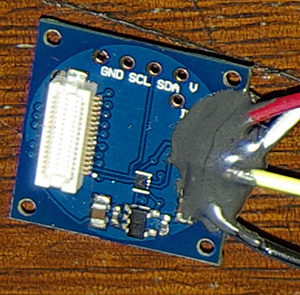
I used JB weld to provide support for those delicate solder connections.

I used JB weld to provide support for those delicate solder connections.

So their voltage regulator, and level shifter, could do all the work for me if I could lift those traces.  But that was going to be the most delicate soldering work I have ever attempted. And I won’t pull your leg, it was grim, very grim indeed. Excess heat from the iron  conducted across the board and melted the previous joints with each additional wire I added.  So while the sensors themselves came off easily with an drywall knife, it took two hours (of colorful language…) to lift the traces out to separate jumper wires. I immediately slapped on a generous amount  of JB weld, because the connections were so incredibly fragile. I produced a couple of these breakouts, because I have other sensors to test, and I face this same logic level/voltage problem on the I2C lines every time I power the unregulated Tiny duino’s from a computer USB port.

With a connection to the mcu sorted, it was time to look at the pressure sensor itself. Because I wanted the sensor potted as cleanly as possible, I put the resistor, capacitor, and connections below the breakout board when I translated the suggested connection pattern from the datasheets to this diagram:

The viewed from above, with only one jumper above the plane of the breakout board.

This is viewed from above, with only one jumper above the plane of the SOIC-8 breakout. I used a 100nF (104) decoupling cap. The PS pin (protocol select) jumps to VDD setting I2C mode, and a 10K pulls CSB high, to set the address to 0x76. Connecting CSB to GND would set the I2C address to 0x77 so you can potentially connect two MS5803 pressure sensors to the same bus.

And fortunately the solder connections are the same for the 5 bar, and the 2 bar versions:

I've learned not waste time making the solder joints "look pretty". If they work, I just leave them.

I’ve learned not waste time making the solder joints “look pretty”. If they work, I just leave them.

After testing that the sensors were actually working, I potted them into the housings using JB plastic weld putty, and Loctite E30CL:

The Loctite applicator gun is damned expensive, but it does give you ultra-fine control.

The Loctite applicator gun is expensive, but it gives you the ability to bring the epoxy right to the edge of the metal ring on the pressure sensor.

So that left only the script. The clearly written code by by Walt Holm  (on the Open ROV github) was designed around the 14 bar sensor; great for a DIY submersible, but not quite sensitive enough to detecting how a rainfall event affects an aquifer.  So I spent some time modifying their calculations to match those on the 2 Bar MS5803-02 datasheet :

// Calculate the actual Temperature (first-order computation)
TempDifference = (float)(AdcTemperature – ((long)CalConstant[5] * pow(2, 8)));
Temperature = (TempDifference * (float)CalConstant[6])/ pow(2, 23);
Temperature = Temperature + 2000; // temp in hundredths of a degree C

// Calculate the second-order offsets
if (Temperature < 2000.0) // Is temperature below or above 20.00 deg C?

{T2 = 3 * pow(TempDifference, 2) / pow(2, 31);
Off2 = 61 * pow((Temperature – 2000.0), 2);
Off2 = Off2 / pow(2, 4);
Sens2 = 2 * pow((Temperature – 2000.0), 2);}

else

{T2 = 0;
Off2 = 0;
Sens2 = 0;}

// Calculate the pressure parameters for 2 bar sensor
Offset = (float)CalConstant[2] * pow(2,17);
Offset = Offset + ((float)CalConstant[4] * TempDifference / pow(2, 6));
Sensitivity = (float)CalConstant[1] * pow(2, 16);
Sensitivity = Sensitivity + ((float)CalConstant[3] * TempDifference / pow(2, 7));

// Add second-order corrections
Offset = Offset – Off2;
Sensitivity = Sensitivity – Sens2;

// Calculate absolute pressure in bars
Pressure = (float)AdcPressure * Sensitivity / pow(2, 21);
Pressure = Pressure – Offset;
Pressure = Pressure / pow(2, 15);
Pressure = Pressure / 100; // Set output to millibars

The nice thing about this sensor is that it also delivers a high resolution temperature signal, so my stationary pressure logger does not need a second sensor for that.
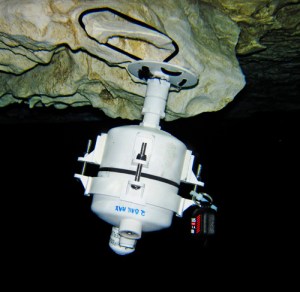
A Reef census is co-deployed with the pressure sensor to ground truth this initial test.

A Reefnet Census Ultra is co-deployed with my pressure sensor to ground truth this initial run.

So that’s it, the unit went under water on March 22, 2014, and the current plan is to leave it there for about 4 months. This kind of long duration submersion is probably way out of spec for the epoxy, and for the pressure sensors flexible gel cap. But at least we potted the sensor board with a clear epoxy,  so it should be relatively easy to see how well everything stands up to the constant exposure. (I do wonder if I should have put a layer of silicone over top of the sensor like some of the dive computer manufacturers)


Addendum 2014-03-30

I keep finding rumors of a really cheap “uncompensated” pressure sensor out there on the net for about 5 bucks: the HopeRF HSF700-TQ.  But I have yet to find any for sale in quantities less than 1000 units.  If anyone finds a source for a small number of these guys, please post a link in the comments, and I will test them out.  The ten dollar MS5805-02BA might also be pressed into service for shallow deployments using its extended range, if one can seal the open port well enough with silicone. And if all of these fail due to the long duration of exposure, I will go up market to industrial sensors isolated in silicon oil , like the 86bsd, but I am sure they will cost an arm and a leg. 

Addendum 2014-04-15

Looks like Luke Miller has found the the float values used in the calculations from the ROV code generates significant errors. He has corrected them to integers and posted code on his github. Unfortunately one of the glitches he found was at 22.5°C, right around the temperature of the water my units are deployed in. I won’t know for some months how this affects my prototypes. With my so many sensors hanging off of my units, I don’t actually have enough free ram left for his “long int” calculations, so I am just logging the raw data for processing later.

Addendum 2014-09-10

The unit in the picture above survived till we replaced that sensor with a 5-Bar unit on Aug 25th. That’s five months under water for a sensor that is only rated in the spec sheets for a couple of hours of submersion. I still have to pull the barometric signal out of the combined” readings, but on first bounce, the data looks good (mirroring the record from the Reefnet Sensus Ultra)  Since the 2-Bar sensor was still running, it was redeployed in Rio Secreto Cave (above the water table) on 2014-09-03. It will be interesting to see just how long one of these little sensors will last.

Addendum 2014-12-18

The 2Bar unit (in the photo above) delivered several months of beautiful barometric data from it’s “dry” cave deployment, and was redeployed for a second underwater stint in Dec 2014. The 5Bar unit survived 4 months of salt water exposure, but we only got a month of data from it because an epoxy failure on the temperature sensor drained the batteries instantly.  After a makeshift repair in the field, it has now been re-deployed as a surface pressure unit. The good news is that we had the 5Bar sensor under a layer of QSil 216 Clear Liquid Silicone, and the pressure readings look normal compared to the naked 2bar sensor it replaced. So this will become part of my standard treatment for underwater pressure sensors to give them an extra layer of protection.

[NOTE: DO NOT COAT YOUR SENSORS LIKE THIS! this silicone rubber coating failed dramatically later – it was only the stable thermal environment of the caves that made it seem like it was working initially and the silicone also seemed to change its physical volume with long exposure to salt water.  I’m leaving the original material in place on this blog as it’s an honest record of the kinds of mistakes I worked through during this projects development.]

Addendum 2015-01-16

I know the MCP9808 is a bit redundant here, but at only $5, it's nice to get to ±0.25C accuracy. The MS5803's are only rated to ±2.5ºC

I know the MCP9808 is a little redundant here, but at $5 each, it’s nice to reach ±0.25ºC accuracy. The MS5803’s are only rated to ±2.5ºC, and you can really see that in the data when you compare the two. The low profile 5050 LED still has good visibility with a 50K Ω limiter on the common ground line. Test your sensors & led well before you pour the epoxy! (Note: the 9808 temp sensor & LED pictured here failed after about 8 months at 10m. I suspect this was due to the epoxy flexing under pressure at depth because of the large exposed surface area. The MS5803 was still working fine.)

Just thought I would post an update on how I am mounting the current crop of pressure sensors.  My new underwater housing design had less surface area so I combined the pressure sensor, the temperature sensor, and the indicator LED into a single well which gives me the flexibility to use larger breakout boards. That’s allot of surface area to expose at depth, so I expect there will some flexing forces. At this point I have enough confidence  in the Loctite ECL30 to pot everything together, even though my open ocean tests have seen significant yellowing. The bio-fouling is pretty intense out there, so it could just be critters chewing on the epoxy compound. Hopefully a surface layer of Qsil will protect this new batch from that fate.

Addendum 2015-03-02

Just put a 4-5mm coating of Qsil over a few MS5803’s in this new single-ring mount, and on the bench the coating seems to reduce the pressure reading by between 10-50 mbar, as compared to the readings I get from the sensors that are uncoated. Given that these sensors are ±2.5% to begin with, the worst ones have about doubled their error.  I don’t know if this will be constant through the depth range, or if the offset will change with temperature, but if it means that I can rely on the sensor operating for one full year under water, I will live with it.

Addendum 2015-04-06 :  Qsil Silicone Coating idea FAILS

Just returned from a bit of fieldwork where we had re-purposed a pressure sensor from underwater work to the surface. That sensor had Qsil silicone on it, and while it delivered a beautiful record in the the flooded caves, where temperatures vary by less than a degree, it went completely bananas out in the tropical sun where temps varied by 20°C or more per day. I suspect that the silicone was expanding and contracting with temperature, and this caused physical pressure on the sensor that completely swamped the barometric pressure signal. 

Addendum 2016-02-01
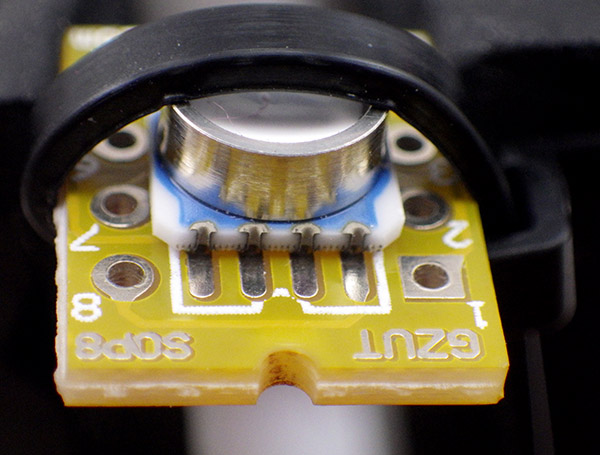
Holding MS5803 sensor in place for soldering

Use the smallest with zip tie you can find.

Since these are SMD sensors, mounting them can be a bit of a pain so I though would add a few comments about getting them ready. I find that holding the sensor in place with a zip tie around the SOIC-8 breakout makes a huge difference.  Also, I find it easier to use the standard sharp tip on my Hakko, rather than a fine point  which never seem to transfer the heat as well.
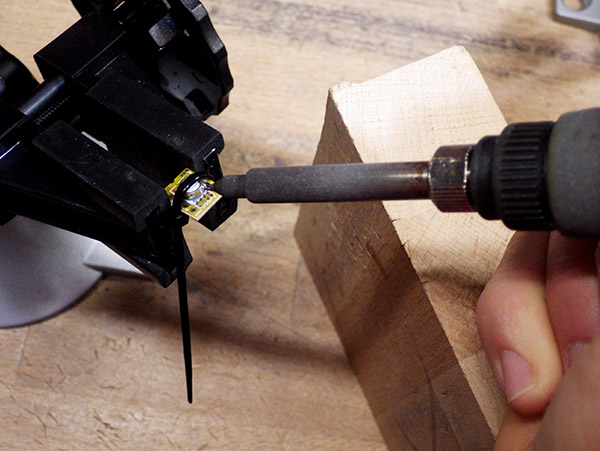
 

SolderingMS5803-2

I also use a wood block to steady my hand during the smd scale soldering.

I plant the point of the iron into the small vertical grooves on the side of the sensor.  I then apply a tiny bead of solder to the tip of the iron, which usually ends up sitting on top, then I roll the iron between my fingers to bring this the bead around to make contact with the pads on the board. So far this technique has been working fairly well, and though the sensors do get pretty warm they have all survived so far.  If you get bridging, you can usually flick away the excess solder if you hold the sensor so that the bridged pads are pointing downwards when you re-heat them.
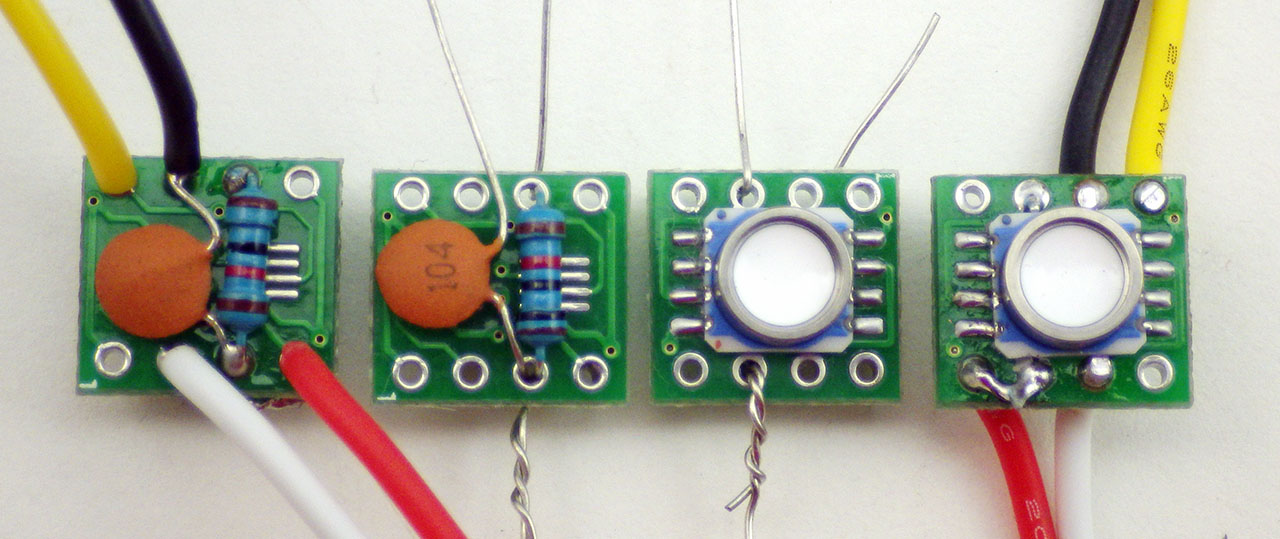
 

Stages of MS5803 mounting procedure

After mounting the sensor to the breakout board, I think of the rest of the job in two stages: step one is the innermost pair (which are flipped horizontally relative to each other) , and step two by the outermost pair where I attach the incoming I2C wires.  Here SCL is yellow, and SDA is white.  In this configuration CSB is pulled up by that resistor, giving you an I2C address of 0x76.  If you wanted a 0x77 buss address, you would leave out the resistor and attach the now empty hole immediately beside the black wire to that GND line.

Sometimes you need to heat all of the contacts on the side of the sensor at the same time with the flat of the iron to re-flow any bridges that have occurred underneath the sensor itself. If your sensor does not work, or gives you the wrong I2C address, its probably because of this hidden bridging problem.
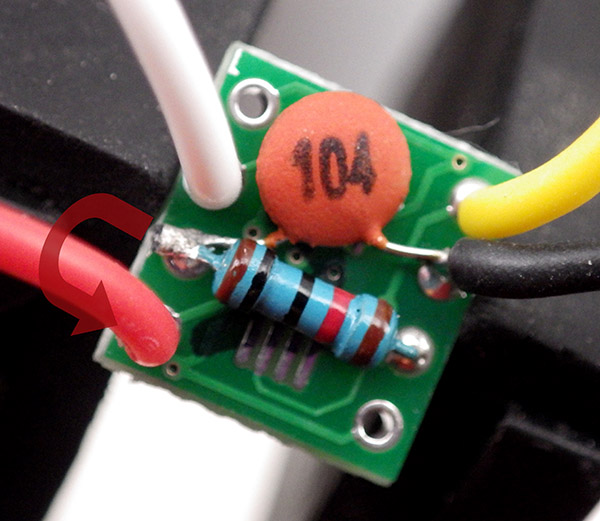
back side connection ms5803

Adafruit still makes the nicest boards to work with, but the cheap eBay SOIC8 breakouts (like the one pictured above)  have also worked fine and they let me mount the board in smaller epoxy wells.  Leave the shared leg of the pullup resistor/capacitor long enough to jump over to Vcc on the top side of the board .

Addendum 2016-03-08

Have the next generation of pressure sensors running burn tests to see what offsets have been induced by contraction of the epoxy.  I’ve been experimenting with different mounting styles, to see if that plays a part too:
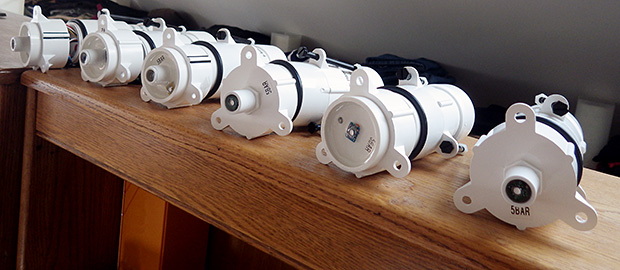
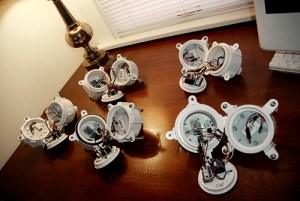
These housings are still open, as it takes a good two weeks for the pvc solvent to clear out...

The housings are left open during the bookshelf runs as it takes a couple of weeks for the pvc solvent to completely clear out, and who knows what effect that would have on the circuits. (Note: for more details on how I built these loggers and housings, you can download the paper from Sensors )

The MS5803’s auto-sleep brilliantly, so several of these loggers make it down to ~0.085 mA between readings, and most of that is due to the SD card.  I’m still using E-30Cl, but wondering if other potting compounds might be better? There just isn’t much selection out there in if you can only buy small quantities. The E30 flexed enough on deeper deployments that the bowing eventually killed off the 5050 LEDs. ( standard 5mm encapsulated LEDs are a better choice ) And I saw some suspicious trends in the temp readings from the MCP9808 under that epoxy too…

Addendum 2016-03-09

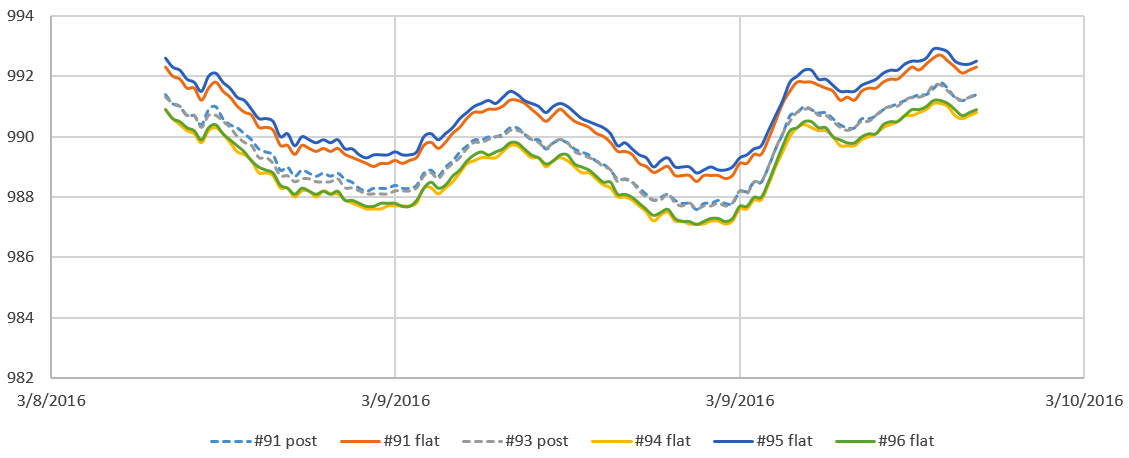
Just a quick snapshot from the run test pictured above:
PressureSensorTest_20160309

These are just quick first-order calculations (in a room above 20°C). Apparently no effect from the different mounting configurations, but by comparison to the local weather.gov records, the whole set is reading low by about 20 mbar. This agrees with the offsets I’ve seen in other MS5803 builds, but I am kicking myself now for not testing this set of sensors more thoroughly before I mounted them. Will do that properly on the next batch.

Addendum 2016-09-22
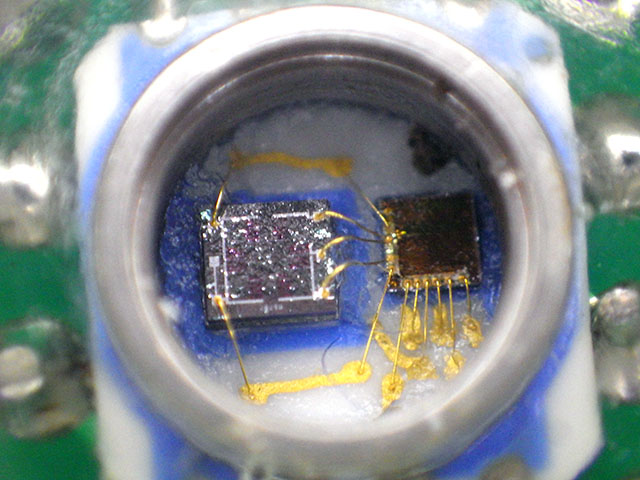
The inside of an MS5803, after the white silicone gel covering the sensor was knocked off by accident.

You can change the I2C address on these sensors to either 0x76 or 0x77 by connecting the CSB pin to either VDD or GND. This lets you connect two pressure sensors to the same logger, and I’ve been having great success putting that second sensor on cables as long as 25 m. This opens up a host of possibilities for environmental monitoring especially for things like tide-gauge applications, where the logger can be kept above water for easier servicing. It’s worth noting that on a couple of deployments, we’ve seen data loss because the senor spontaneously switched it’s bus address AFTER several months of running while potted in epoxy. My still unproven assumption is that somehow moisture penetrated the epoxy, and either oxidized a weak solder joint, or provided some other current path that caused the sensor to switch over.

Addendum 2017-04-30

Hypersaline environments will chew through the white cap in about 3 months.

Given what a pain these little sensors are to mount, it’s been interesting to see the price of these pressure sensor breakout modules falling over time. This spring the 1 & 14 bar versions fell below $24 on eBay.  Of course they could be fake or defective in some way, but I’m probably going to order a few GY-MS5803’s to see how they compare to the real thing.

Addendum 2020-02-29:  Mounting Pressure Sensors under Oil

When exposed to freshwater environments & deployed at less than 10m depth, a typical MS5803 gives us 2-3 years of data before it expires. However we often do deployments in ocean estuaries where wave energy & high salt concentrations shorten the operating life to a year or less. So now we mount them on replaceable dongles, so that it’s easy to replace an expired sensor in the field. I described that sensor mounting system in the 2017 build videos:

Media isolated pressure sensors are common in the industrial market, but they are quite expensive.  So we’ve also used these dongles to protect our pressure sensors under a layer of  oil.  I’ve seen this done by the ROV crowd using comercial isolation membranes, or IV drip bags as flexible bladders, but like most of our approaches, the goal here was to develop a method I could retro-fit to the units already in the field, and repair using materials from the local grocery store:

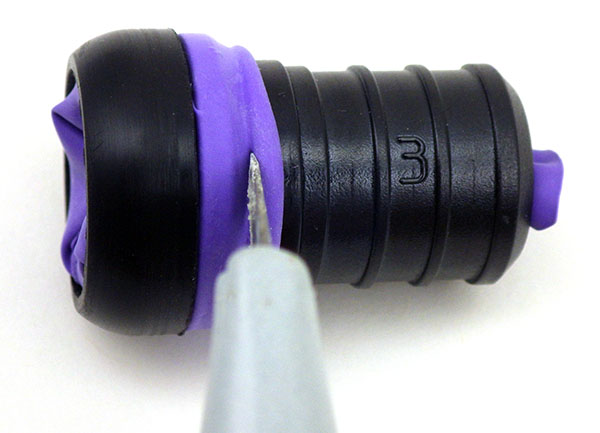
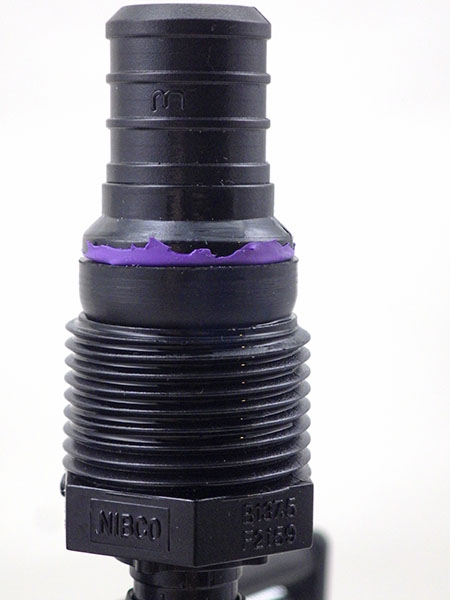
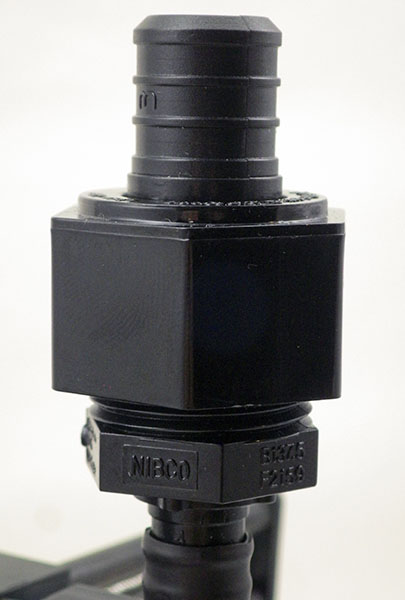
The sensor is already potted into a NIBCO 1/2″ x 3/4″ Male Pex Adapter, to which we will mate a NIBCO 3/4″ Female Swivel Adapter.

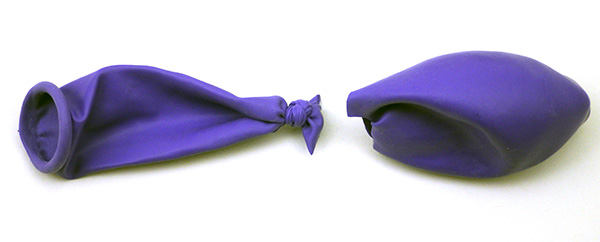
Since the balloon in this case is too large, I simply tie & cut it down to size.  You can also cut your membrane from gloves or use small-size nitrile finger cots

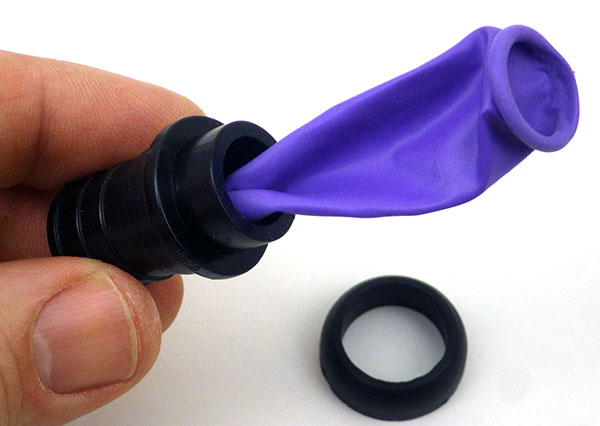
Remove the O-ring from the swivel adapter stem and insert the ‘neck’ of the balloon.

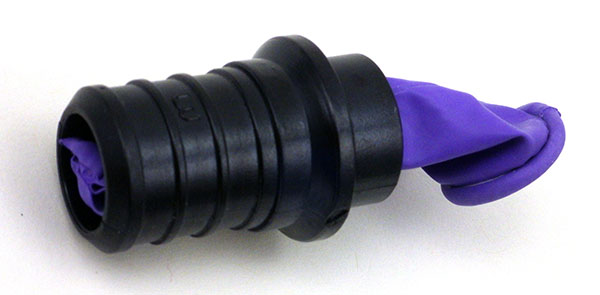
Pull the balloon through till the knot-end becomes visible.

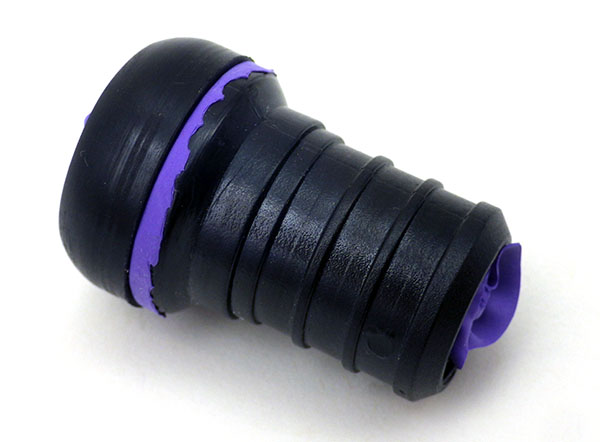
Pull the balloon over the rim on the other side of the pex adapter.

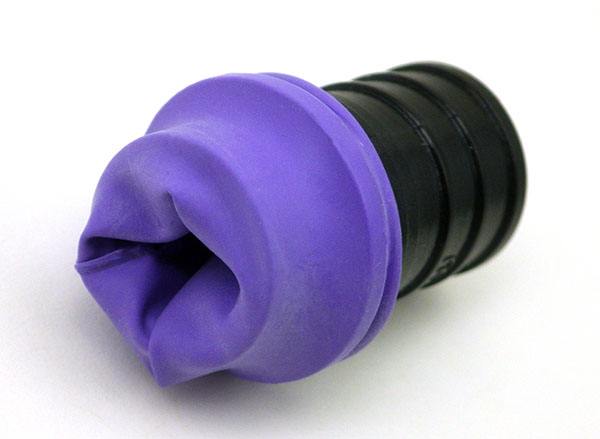
Place the O-ring over the  balloon, and cut away the rolled end material.

Now the threaded swivel ring will not bind on rubber when it gets tightened. Note the knot is just visible at the stem

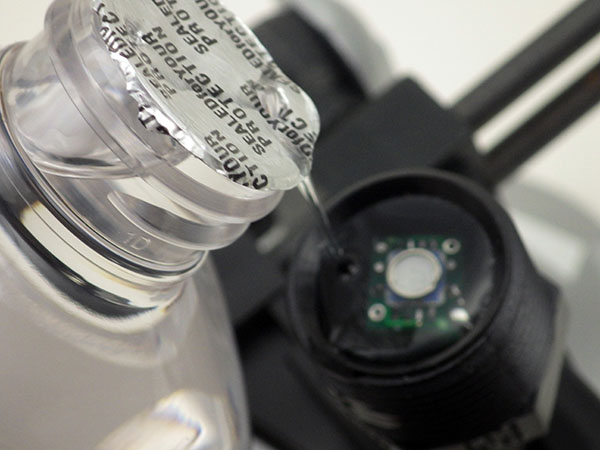
Fill the mounted sensor ‘cup’ with silicone oil or mineral oil. You could also use lubricants produced by o-ring manufacturers that do not degrade rubbers over time.


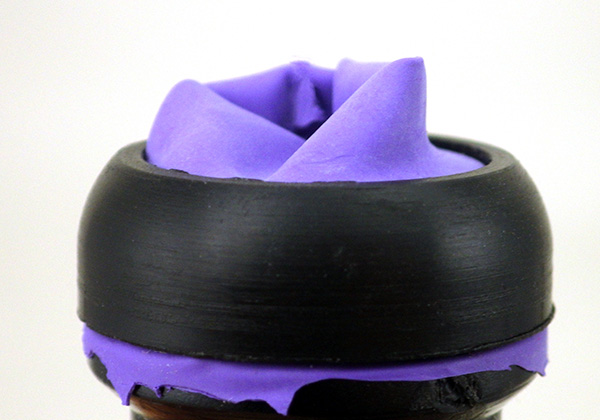
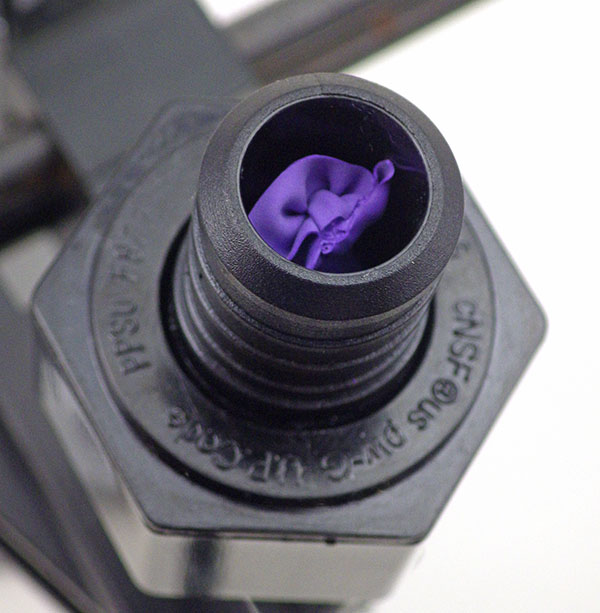
Gently push the balloon back out of the stem so that there is extra material in direct contact with oil. You don’t want the membrane stretched tight when you bring the parts together.

Then place the swivel stem on the sensor cup with enough extra membrate so it can moves freely inside the protective stem.

. . . and tighten down with the threaded ring to create a water-tight seal.


After assembly the membrane material should be quite loose to accommodate pressure changes & any thermal expansion of the oil.

Small trapped air bubbles can cause serious problems in dynamic hydraulic systems, but I don’t think the volume of air in the balloon matters as much when you are only taking one reading every 5-15 minutes.  If you do this oil mount with other common pressure sensors like the BMP280 then you are pretty much guaranteed to have some kind bubble inside the sensor can, but so far I have not seen any delta when compared to ‘naked’ sensors of the same type on parallel test runs. It’s also worth noting that depending on the brand, finger cots can be quite thin, and in those cases I sometimes use two layers for a more robust membrane. Put a drop or two of oil between the joined surfaces of the membranes with a cotton swab to prevent binding – they must slide freely against each other and inside the pex stem.
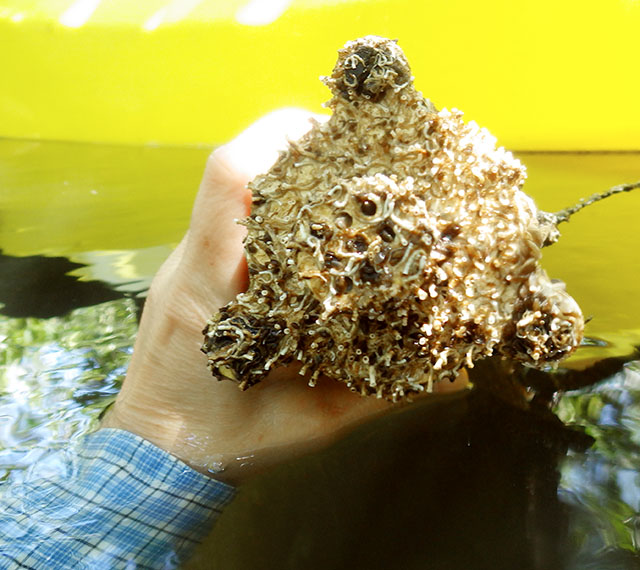
Yes, there is a pressure sensor buried in there! We got data for ~3.5 months before the worms covered it completely. In these conditions a larger IV bag is a better choice than the small oil reservoir I’ve described above. Simply attach that flexible oil-filled bladder directly to the stem of a 1/2″pex x 3/4″swivel connector with a crimp ring.

It’s also worth adding a comment here on the quality of the oil that you use. For example, silicone oil can be used on o-rings, and sources like Parker O-ring handbook describe this as “safe all rubber polymers”. But it’s often hard to find pure silicone oil and hardware store versions often use a carrier or thinner (like kerosene) that will damage or even outright dissolve rubbers on contact. And although we’ve used the mineral oil/balloon combination for short periods, nitrile is a better option in terms of longevity. With nitrile’s lower flexibility, you have to be careful when fitting cots over the o-ring end of the connector tube because it leaves leaky folds if theres too much extra material, or tears easily if it’s too small.  In all cases the flexible material should fit into the stems 3/4 inch diameter without introducing any tension in the membrane when you assemble the connector parts. It must be free to move back & forth in response to external pressure changes.

Our latest housing design with direct connections to make sensor replacement easier

Also note if you have to build one of the larger white PVC sensor cups shown in the video (because your sensor is mounted on a large breakout board) then I’ve found that clear silica gel beads make a reasonable filler material under the breakout board BEFORE you pour the potting epoxy into the sensor well.  This reduces the amount epoxy needed so that there is less volume contraction when it cures, but a low viscosity epoxy like E30CL still flows well enough around the beads and allows the air bubbles to escape.  With wide diameter sensor cups, you will probably have to switch over to something like a polyurethane condom as the barrier membrane.

Addendum 2021-10-12:

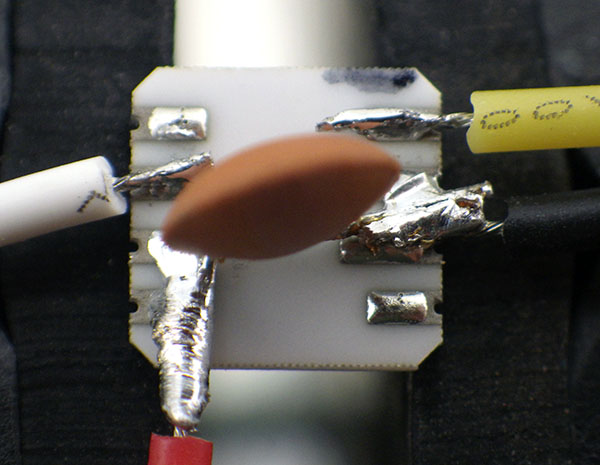
Just an update on how I now prepare these raw sensors: 30 AWG breakout wires attach directly to the MS5803 pressure sensor with CSB to GND (setting sensor address to 0x77) & PS bridged to Vcc (setting I2C mode) via the 104 ceramic decoupling capacitor legs. In these photos SDA is white & SCL is yellow.
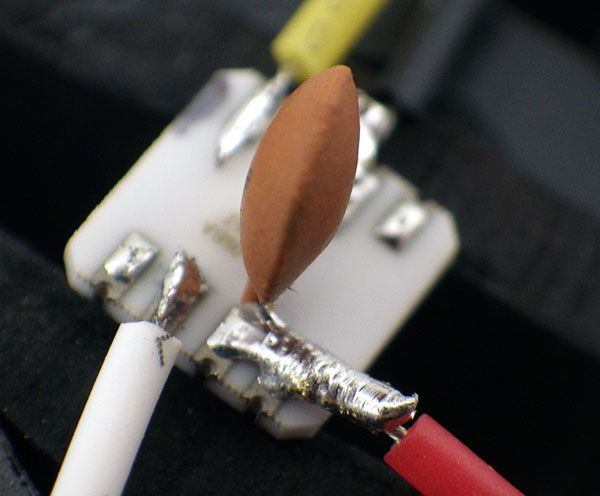
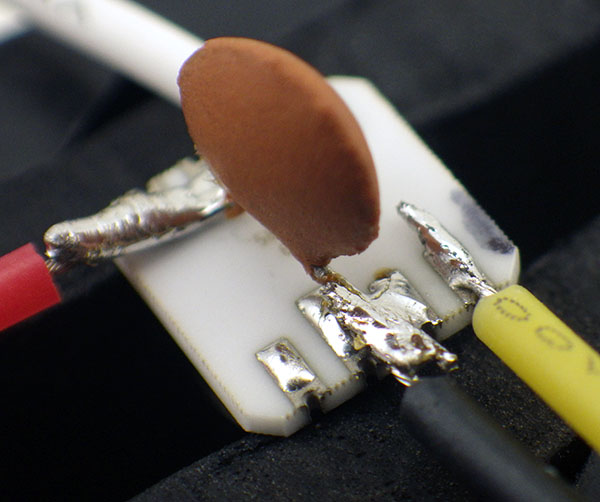
The wire connections are then embedded in epoxy inside our standard sensor dongles.

Addendum 2024-09-15:

We posted a new tutorial on: How to Normalize a Set of Pressure Sensors. There are always offsets between pressure sensors from different manufacturers, and normalization lets you use them together in the same sensor array.
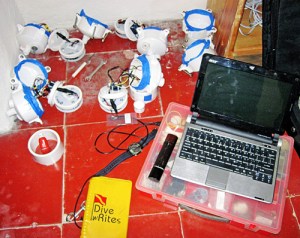
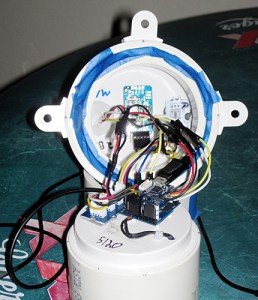
Field Report 2014-03-22: The next generation of flow sensors is deployed.

The Field Testing Station.

The field testing station. The polished O-ring seats are covered with blue painters tape for protection.

After the successful retrieval, I set to work on scripts for the next generation of sensors. It’s amazing how the kind of focus that coding requires can really mess with your perception of time, leaving you feeling that everything is being done at the last possible minute, though you have been working on it for several days... But after some datasheet slogging (thanks once again to the folks at Turtle Bay Cafe for their patience), the units started to produce reasonable
numbers, and on the morning of the 20th we were “all systems go”. I had three pendulum units (plus one backup) and one high resolution pressure sensor ready to deploy.   The pressure sensor would be stationary to record the water level, and I did not want it swing around on a pendulum until I get a chance to do a bit more homework on the calculations required to compensate for that motion.

As usual, we had one unit misbehave on the bench so badly it needed a complete "brain transplant".

We had one unit misbehaving so badly it needed a complete “brain transplant”, but the modular design of the system meant this was pretty easy to do.

The low power consumption of our bench tests gave me the confidence to set a couple of the loggers to 5 minute sampling intervals, while leaving the third on a more conservative 15 minute schedule. (in case the faster loggers run out of juice before we can collect them). Then we sealed everything up and set out to collect the tanks, etc. from our friend Bil Phillips at Speleotec dive shop in Tulum. On the way there I monitored the heartbeat LED’s.  But unit 3 did not pip, so while Trish sorted the dive gear I cracked it open to find that indeed, it was not logging (I suspect because of a loose RTC alarm/interrupt line).  As luck would have it, a couple of researchers working with a group from Denmark/Austria  (who have done some impressive work ) arrived to prepare for their days dive. They were testing some newly developed 3D scanning equipment, including a flow meter using an optical method based on laser tracking of particles. A good nurtured discussion ensued about the pros & cons of different measurement methods: “How will you calibrate?” “That’s going to be really non linear..” “Yep, but I have no problems with bio-fouling, and no issues with salinity/refractive index…” I will skip the rest of the nerdy details, but let’s just say there’s nothing like a bit of friendly competition to motivate…

I used the deflection of an 8 inch cable tie as a rough field balance. Units were tuned to approximately 10-20 grams negative.

I used the deflection of an eight inch cable tie as a rough field balance. The units were tuned to  approximately 10-20 grams negative.

Once out at the site, I tried to standardize the buoyancy of each unit. The beta’s had significant variation in their response to water flow, and my goal on this build was to achieve a more reasonable amount of inter-unit consistency. Even with stainless steel bolts on the housings, I still had to add about 150 grams of ballast to each logger. (weighted towards the top of the units to offset any torque from the internal mass of the AA batteries)  I am not happy about all that hard iron near my compass sensor, but the data will tell me if it causes a serious problem, as compared to all the other factors, like the batteries, etc. My humble budget will not extend to a degaussed power supply!

They are deployed quite close together, to allow me to assess inter-unit response for this build.

They are deployed quite close together, to allow me to assess inter-unit response for this build.

Low channel flow meant that the deployment dive was pretty easy, and we re-occupied the previous logger location for a continuous data set. The new bungee cord anchors are much easier to attach to the ceiling of the cave than the knots of nylon string used earlier, but of course we don’t yet know how long the rubber will last. Despite my surface testing, I still needed to transfer a few ballast washers to achieve a similar angle of inclination on the pendulums.  During this operation I was promising myself that the next units will be much more compact, and have no metal parts on the outside.  After a final inspection swim, with the capture of a little video, we were done.  Although the whole installation went smoothly, the earlier delays from Unit 3, and my buoyancy calibrations, made for a very long day, so it was well after dark when we finally left the water. After so many months of work, I could finally relax a moment and take it all in – my little cave pearls are starting to feel like a “real” scientific monitoring platform:

(Yeah, shakey cam: but our WG-3 croaked last year and the Heros are not great in low light, so this was captured on a little Powershot D10, that’s nearly 10 years old)

It will be a while before we see data from the new units, but I am confident we will see good numbers from them. (…still have my fingers crossed though!) I think I need to go have a moment on the beach, before my brain starts chewing on all fixes for the next build. I have homework to do before I get a good electrical conductivity sensor in the mix that can cover the entire fresh to marine range (standard electrodes are not designed for this) but I wonder what else I could add to the little loggers?

<— Click here to continue reading—>

Field Report 2014-03-19: The Cave Pearls have landed!

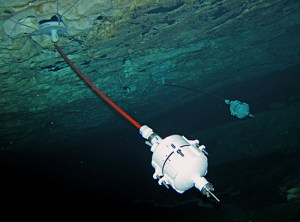
About to surface with the beta loggers.

About to surface with the beta loggers.

All the usual grumbles of getting our kit out of storage and ready to roll delayed the Beta unit retrieval till late afternoon, and I was really chomping on the bit by that point. It was a good haul against the current out to the deployment site, but once there I was very happy to see our little loggers swaying gracefully. After a good visual inspection, to examine the anchors and brush away the sizable clumps of rusty brown goo that had grown on the exposed metal, we popped them into a mesh bag and headed back to the surface.  With my ears above water, I dared a few little shakes to check…had they leaked….?

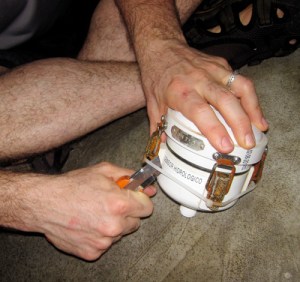
Breaking the seal.

Breaking the seal.

We cradled the loggers all the way back to Tulum while we waited for them to dry out.  After a quick rinse, we stowed the dive gear and then set to work on the pearls. Both of them opened with a satisfying “ssshhhick” indicating that the seals were indeed good. (they were compressed a bit at depth) I have to admit I have been working on the new builds so intensively, I laughed to see the tape that was holding these guys together, and the leggo I had solvent welded into the battery compartments. I checked the hour: it was 7:45pm…perfect time to cut the power, as the units had been left on a 1/2 hour sampling schedule. Once the power was disconnected, I could breathe a sigh of relief, as we  were then safe from any further calamities that might hurt the precious SD cards. But we did not have a reader with us, and as usual, Trish had filled the evenings schedule with meetings with some of the other researchers in town. In the end it was 11:00 pm before we could look at the SD cards and know if our little experiment was truly a success….

And it was! In fact both units were collecting readings right up to the point where I disconnected the battery. Woot! Trish went to work, and I just sat back, impressed by the super sonic “squiggle wrangling”.

“Temps…no trending..but nothing useful there… offsets…”, she was talking to the screen more than to me. No surprise on the temperature data as the readings were from the RTC, completely trapped inside thermal mass of the housing.

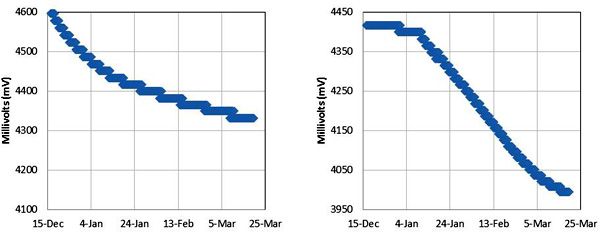
“Can you bring up the two voltage curves?” I asked, “I want to know how we did on power consumption.”

“Right.”…clickety, clickety, click… “How’s this?”

Left: Unit 1    Right: Unit 2 (rubber bottom)

Left: Unit 1 Right: Unit 2 (w rubber bottom)

Quite a difference, but both units had run in the > 4 volt range for three months.  So we had been far too conservative with the 30 minute sampling routine, although I had no way to know that when they went in last year. Pretty much identical components in the build, so for now I am attributing the different power curves to the mix of batteries that were used.

“Z offsets….X and Y as well….” clickity, click… “…easy to fix… and we can do a quick running average for that noise…”

“No, don’t fix it!” I injected, “I want to see the raw data,  side by side.”

Trish’s hands paused, and she dropped out of the excel trance long enough to give me a puzzled look: “Why would you want that?”

I explained that while she was rapidly turning the numbers into something relevant to the actual water flow, I (as the builder) wanted to know how the two units compared to each other, as basic machines…

“Hmmm, Ok”….

Left: Unit1  Right:Unit2  Raw z Axis, sub-sample

Left: Unit1 Right:Unit2 Raw z Axis, sub-sample

The different amplitudes were not a surprise, as our buoyancy control was just best guess approximation. But in theory, the accelerometers were identical, so the offsets were kind of interesting.  Ah well, it will be a while yet before I am at the point of calibrating these things…

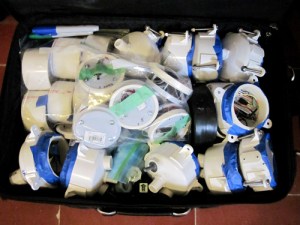
I am still amazed that all this makes it through the airport scanners...

I am amazed that we don’t get more grief from airport security when we travel with this kit.

Trish was still talking to the screen  “mmmm…some finer structures here…”, and clicking away, but it was nearing 1:30 am at this point, and I was starting to fade. I uploaded all the data to a Google doc, and suggested that we call it a day.
I knew what I still had ahead of me ->

I hope that Turtle Bay Cafe doesn’t mind if I take up residency for a few days, while I work on the next generation:

“Mass caffecito porfa…”

<—Click here to continue reading—>

The new fleet of flow sensors is ready to sail!

Hi everyone. I wrote most of this entry on a plane today, as it was almost the first free time I’ve had “away from the workbench” since the initial proof of concept loggers were deployed last year. I have redesigned the Cave Pearl data loggers into a more modular platform that should be flexible enough for quick field repairs, while enabling future development with more sensors.  (I want at least CTD, and my wife has an infinte supply of other suggestions  🙂

The loggers are now assembled in four interchangeable components, which from top to bottom are:

1) Upper housing

It was too cold in the basement for the epoxies to set properly...

It was too cold in the basement for the epoxies to set

Lots of lessons have been learned here about sealing the hull penetrations thanks to the diy ROV crew. Sort lengths of 3/4 pipe form “wells” to protect the sensors, with JB Plastic Weld putty wrapped around the wires as they initially pass through from the inside of the housing. The putty sets on the roughened surface, pluging the hole and holding the sensors in position, but I found that the silicones I tested flex quite a bit after curing, so they are too easily “sheared” away from the pvc surface. As a result,  the current builds use JB weld around the DS18B20 thermal sensors, and Loctite E-30CL to for a transparent seal over the “heartbeat” LEDs which pip when the samples are taken. Experience has shown me that you must have some way of knowing your units are working happily (or if they are in an error state…) before you dive them into the cave.

2) Main electronics platform

The LED is an Octopus Brick because they had a good buckled connector, and the RTC is a cheap DS3231 module from eBay because I wanted the AT24C32 it had on board.

The LED is an Octopus Brick because they had a good buckled connector, and the RTC is a cheap DS3231 module from eBay because I wanted to use the AT24C32 eeprom it also had on board.

I am still quite happy with Tinyduino, as the package integrates the mcu, accelerometer, and now digital compass, with the smallest footprint and the least amount of extraneous wiring. I put riser pins on their new overhanging protoboard, and this jumps out to a grove I2C hub as a central interconnect system allowing me to interchange the logger platform with housings that will sport different sensors in future.  All of the electronic components have had a good bath of conformal coating this time around, so hopefully they will be a bit more robust. (I might try Rustoleums Neverwet next time)

3) Power supply

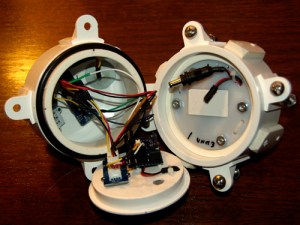
The gap between the two shells provides room for the interconnect, and some filtering caps, etc. if needed.

The gap between the two shells provides room for the interconnect, and some filtering caps, etc. if needed.

Physically it’s just two pvc knockout caps held together with four bolts & a 1cm “hold down ring” to keep it in place in the lower housing. Electronically there are two versions. The first is an unregulated supply uses two banks of 3 AA batteries, through Shottky diodes to prevent the banks from draining unequally. This supply will drop from 4.5 volts down to a lower cutoff of 2.8 volts before the system stops logging, so it needs fairly robust sensors. The second power supply uses three banks of 2 AA batteries (with three Shottky’s) feeding into an NCP1402 3.3 volt boost regulator which then powers the logger. Several of the sensors I want to use have a strict 1.8-3.3v input range, so they can not be used with an unregulated system. It will be interesting to see if the greater “draw-down” enabled by a boost regulator compensates for the power it wastes (here about 25%). This deployment will hopefully be some months long, so I will find out how the regulated VS unregulated systems actually perform.

4) Lower housing & external weight system

This series needs about 100-150 grams of ballast mass to be neutral.

This series needs about 100-150 grams of ballast mass to be neutral.

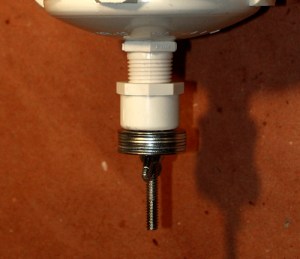
The buoyancy troubles we had on the initial deployment showed me that I needed some form of external system to compensate for changes in battery mass, cable buoyancy, salinity, etc. So I have a simple solution using a bolt through a threaded end cap which holds a number of washers as ballast. All stainless steel, but I am curious to see how long they actually last in the near marine environment. The buoyancy mass will be spit evenly on the top & bottom of the units to prevent rotational torques which which would affect the angle readings.

The battery run down tests are still looking very good for one year + deployments!

The battery run down tests are still looking very good for one year + deployments!

So this is the new fleet: Four pendulum units and one high resolution temperature &  pressure sensor that will remain stationary.  Hopefully they will all be underwater logging in a few days. Looking back at the build journal, I should add that there has also been a fair bit of coding, but I will post details on all that later, after I have integrated support for the HMC5883L digital compass & MS5803 pressure sensors into the main logger script.

BUT before we deploy these new units,  we need to go and retrieve Beta’s 1&2 which we left in a cave last December.  My fingers are crossed that they have survived these last few months under water…

<—Click here to continue reading—>

Addendum 2015-01-07

For the DIYers out there, I should mention that this housing style proved quite robust through several deployments in 2014, and probably could go to substantial depth due to the thickness of the 3″ end caps.  But in early 2015 I came up with a new design built with Formufit table caps, which is much easier to assemble provided you can squeeze your electronics package into 2″ pipe.

Using a DS18B20 Temperature Sensor “without” a dedicated Arduino library

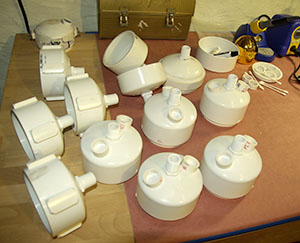
New housings in production

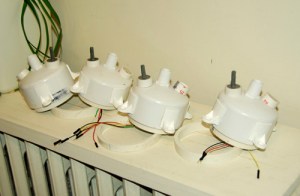
New housings in production. The sensor wells on top will be filled with epoxy to seal the hull.  Note: some of these housings have unnecessary “chunks” of PVC on the outside, as I made them for latch clamps which I am no longer using in the design.

I haven’t had time to post to the blog lately, as I am now in full-on production mode: trying to get five full units running for deployment next week.  Between all the cutting and sanding of the new underwater housings, I have been investigating sensors, and thinking about how to make the entire unit modular enough to allow quick field repairs.  The I2C bus architecture becomes very attractive here, because so many sensors are available for it, and I found a nifty I2C hub from Seed studios, which gives me a standard plug for connectivity. But most of the sensors I found want a steady 3.3 volt supply, and that is not available on the Tiny Duino  (the lack of a 3.3v rail is a weakness of the platform but I was the one who wanted to run with no voltage regulator in the first place..) So I started designing a power supply module around a NCP1402-3.3V Step-Up Breakout from Sparkfun.  I knew this was going to waste 25% of my power for this deployment, but I figured I could use lithium AA’s to make up for the loss, and look around for a more efficient voltage regulator later.

No luck with the voltage regulator even though it seemed to be working fine...

It seemed to be working fine…

Well, a frustrating day or two later and I still had no joy from the 3.3v regulator. I don’t know if it was an inrush current brownout, or transient spikes, or output ripple…but for some reason the tiny stack simply will not run from this regulator – all I get is one little pip out of the on-board led and that’s it.  Grrr! There goes about half of sensors I planned to use with the nice I2C breakout boards I had just purchased, unless I can somehow power the sensors “separately” from the main mcu stack. (And there is no guarantee I won’t have the same kind of gremlins pestering me there…)

Time to make lemonade: I had a few DS18B20 one wire temperature sensors, and they are not too choosy about input voltage, so I figured I would give them a try, while just running the Tiny’s from unregulated AA’s (…again).  DS18B20’s are common as dirt, and almost as cheap, and there are libraries for them everywhere. So it should not take long to get them going…right?

Well what I thought was going to take me 30 minutes has actually taken me a day of digging to sort out, so I am posting the result here, to hopefully save someone else the trouble.  The standard approach is to install a Dallas control library, and a one wire library to run this sensor. Most sources suggested the library written by Miles Burton, and the one wire library over at PJRC.  And after a few grumbles, like finding out that zip file created directories with the wrong names  ( “dallas-temperature-control” from the zip extraction needs to be renamed to “DallasTemperature” for it to work) I did get the test code running…sort of. Now don’t get me wrong, Miles Burton has created a veritable swiss army knife of a library, but a tiny script for this one sensor weighed in at 8,772 bytes. That’s almost a third of the available program memory, and I already knew my data logger script was around 22 k (with accelerometer) , so that was not going to leave much space for the other sensors I want to add.

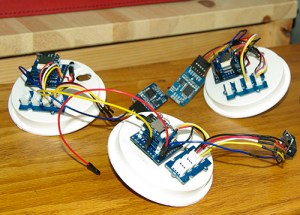
Logger units with I2C hub for sensor and RTC connections.

Logger units with I2C hub for sensor and RTC connections.

And while I was sorting all that out, I discovered another problem with the DS18b20: Every once and a while it was throwing out a spurious reading of 85 degrees, but it was frustratingly intermittent. More run tests with different settings showed that the error never happened when I had the sensor set to run at 9-bit, but it popped up more frequently as I raised the bit depth. Back to digging through the forums, which revealed that this is a pretty common issue with the DS18b20. The “default” setting of the registers produces the 85, which is what you get if you read the sensor too soon after a reset. If you sift through the datasheet, you find that when you ask the sensor for the full 12 bits of resolution, you need to wait at least 750 ms for the sensor to embed the temperature data in it’s eeprom before you can read it out. So although the sensor only draws 1.5mA during the conversion, and it goes into standby mode right afterwards,  it was going to hold the whole system in limbo for that conversion time, doing some serious damage my the overall power budget.

More googling, and I came across a great little project blog called BitKnitting, where someone managed to use the sensor without a dedicated sensor library. So it was possible! However, they were only using the integer part of the 12 bit register, and I wanted all of the information, as the temperature variations in cave system is often only fractions of a degree C. I found a floating point capture demonstrated over at the Bildr forum. Combining that with a 1 second Watch Dog Timer sleep (to save power while the mcu waits for the sensor’s temperature conversion) produced this little script which weighs in at 5988 bytes. Not much savings on memory, because of the addition of the wdt library, but hopefully much lighter on the projects power budget. I will be weaving this into the main logger code later. I also have a feeling that I can go rooting through those libraries and delete a few functions I am not using to make them lighter, when I have time.

Addendum 2015-02-25

I think this is approaching the largest string I would want to deploy on a dive.

Addendum 2015: I think this is approaching the largest senor string I would want to deploy on a dive.

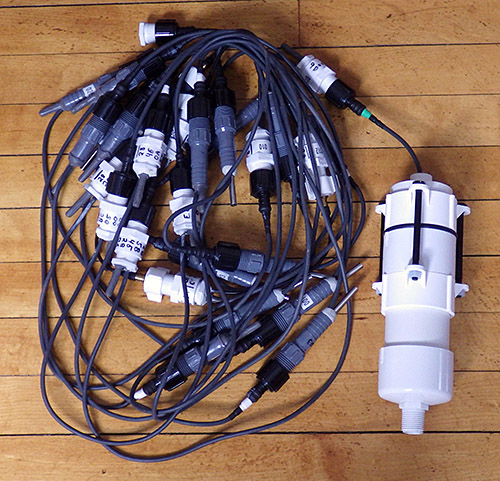
I recently started making long chains of these sensors, in an attempt to build a poor mans thermistor string. Here is a link to the post about those experiments.

Addendum 

The DS18B20 is only supposed to draw around 1μA when in standby, and not being interrogated. So it hardly seems worth the bother of turning them on and off to me, but there are a few people doing so by powering the units directly from the digital pins of the Arduino.  I might investigate that later if I have not used the pins for something more productive.

Addendum

I have also noticed that this sensor seems to warm itself if you have it doing a continuous reads at 12 bit as the script below does (which has the unit at its maximum 1.5 mA current the entire time). So just be warned that if you are using the ‘waterproof’ models, which are encased in a metal sleeve filled with epoxy, you can’t drive the sensor full tilt without internal heat building up & affecting the readings. 

// adapted from https://github.com/BitKnitting/prototypes/blob/master/SensorNode433/SensorNode433.ino
//  and  http://forum.bildr.org/viewtopic.php?f=17&t=779
//  sleep from http://www.gammon.com.au/forum/?id=11497

#include <avr/sleep.h>
#include <avr/wdt.h>

#include <OneWire.h>
const byte DS18B20_PIN=4;  //sensor data pin
OneWire ds(DS18B20_PIN);
byte addr[8];
float DS18B20float;

void setup() {

Serial.begin(9600);

//Set up Temp sensor – there is only one 1 wire sensor connected
if ( !ds.search(addr)) {
Serial.println(F(“—> ERROR: Did not find the DS18B20  Temperature Sensor!”));
return;
}
else {
Serial.print(F(“DS18B20 ROM address =”));
for(byte i = 0; i < 8; i++) {
Serial.write(‘ ‘);
Serial.print(addr[i], HEX);
}
Serial.println();
}
delay (200);
}

void loop() {

DS18B20float = getTemp();
Serial.print(F(“FLOAT temp in celcius: “));
Serial.println(DS18B20float);
//Note: sensor defaults to a reading of 85 if you read it too soon after a reset!
delay (200);  //just a delay to boot out the coms
}

// watchdog interrupt
ISR (WDT_vect)
{
wdt_disable(); // disable watchdog
} // end of WDT_vect

// this returns the temperature from one DS18S20 in DEG Celsius using 12 bit conversion
float getTemp(){
byte data[2];
ds.reset();
ds.select(addr);
ds.write(0x44); // start conversion, read temperature and store it in the scratchpad

//this next bit creates a 1 second WDT delay during the DS18b20 temp conversion
//The time needed between the CONVERT_T command and the READ_SCRATCHPAD command has to be at least
//750 millisecs (but can be shorter if using a D18B20 type with resolutions < 12 bits)
MCUSR = 0; // clear various “reset” flags
WDTCSR = bit (WDCE) | bit (WDE); // allow changes, disable reset
// set interrupt mode and an interval
WDTCSR = bit (WDIE) | bit (WDP2) | bit (WDP1); //a 1 sec timer
wdt_reset(); // pat the dog
set_sleep_mode (SLEEP_MODE_PWR_DOWN);
sleep_enable();
sleep_cpu ();
sleep_disable(); // cancel sleep after wakeup as a precaution

byte present = ds.reset();  //now we can read the temp sensor data
ds.select(addr);
ds.write(0xBE); // Read Scratchpad
for (int i = 0; i < 2; i++) { // Only read the bytes you need? there is more there
data[i] = ds.read();
}
byte MSB = data[1];
byte LSB = data[0];
float tempRead = ((MSB << 8) | LSB); //using two’s compliment
float TemperatureSum = tempRead / 16; //this converts to C
return TemperatureSum;

}


Buffering Logger Sensor Data to a 4K AT24C32 I²C EEprom

These MS5803 pressure sensors are my very first SMD reflow pieces. Hopefully I did not toast them on the kitchen skillet I was using...

These MS5803 pressure sensors are my first  attempt at diy SMD. Hopefully I did not toast them on the electric skillet I was using to reflow…

While I was waiting on the results of the week-long power consumption test of the SRAM buffering script, I continued thinking about other ways I might extend the operating lifespan of the Pearls. I had originally considered using the processors 1024 bytes of internal eeprom for temporary storage, but work over at the solar duino project showed me that using an external 24AA256 is faster and consumes less power than the internal eeprom.  AND the cheap DS3231 RTC boards I had just received from eBay had an AT24C32 eeprom chip: 4k of storage just sitting there waiting to be used…And the data sheets told me that the SD card could be drawing up to 80 ma for who knew how long, while the datasheet for the eeprom listed a paltry 2 ma per block write taking only 5 milliseconds…

Three days of heavy lifting later…I had cobbled together this script, using PSTRING to to dramatically simplify the concatenation of the sensor data into a 28 byte long char buffer (the wire library buffer is only 32 characters long and you need two bytes for the mem address + room for string termination characters, etc).  Pstring uses simple print statements, but more importantly, it never causes buffer overflows if you try to stuff in too much data, like a mishandled sprintf statement could. This also gives me some flexibility while I am still changing my sensors around, as I don’t quite know what the final data is going to look like yet.

So this code buffers each sensor read cycle to the I²C eeprom, using two page writes per cycle.  This simplifies the code a bit, as I have only one set of variables on the go. Then when the countlog = SamplesPerCycle, it does a reverse for loop to pull the data back out of the eeprom, and write it to the SD card. With a rated endurance of 1 million write cycles, I’m not worried about wearing the eeprom out either.

And the result? This script gives me ~700 sensor read cycles per 8mV drop on a 2 AA battery power supply. This is less than half the performance of the SRAM buffering code, which surprised me quite a bit, but I guess that *192 eeprom page writes (with the attendant I2C coms) +1 SD card write per day,  uses 2-3 times as much power as SRAM buffering with 8 SD card write cycles for that same days worth of records. On paper all that eeprom writing represents almost one second per day at 2 mA, which doesn’t seem like much. So either my tiny 128 mb SD cards are very quickly to going back into sleep mode, or keeping the CPU running during all that I2C traffic is using a significant amount of power…?

So what did I learn:  Well knowing that a fair bit of I²C & eeprom traffic will more than double the power drain is quite handy, as I now jump into connecting temperature, pressure, compass, and perhaps other sensors, to those same I2C lines. It will be interesting to see what the real world performance of these loggers is when the rubber meets the…ummm…cave diver.

Addendum 2015-04-18

I simply let the wires I am already using to tap the cascade port I2C lines poke up enough to give me solder points for the EEprom. Don't forget to remove the pullups on the EEprom board.

I simply let the wires I am already using to tap the cascade port I²C lines poke up enough to give me solder points for the EEprom. Don’t forget to remove the pullups on the EEprom board as you already have pullups on the RTC breakout.

The AT24c32 chip can only hold 4k of data –  if you write beyond 4096 bytes, it rewrites over the old data!  So once you have done 128 page writes, you need to flush to the sd card. In this code, I write two 32-byte pages per record. So I have a upper limit of 64 records before I hit that block limit and start to overwrite the data!  I could bump it up to 32k of external eeprom for only $1.50, so I will have to try a few experiments to see if that helps. That 32k eeprom is a code compatible, drop in replacement. All you have to do is change the I2C address for the eeprom for the new board.

Addendum 2014-07-16

The Code below has been posted to the projects GitHub. Look around as the more recent codebuilds are much more elegant than this crude early version, and include sensor support for an easy to build logger.

//Date, Time and Alarm functions using a DS3231 RTC connected via I2C and Wire lib by https://github.com/MrAlvin/RTClib 

// based largely on Jean-Claude Wippler from JeeLab’s excellent RTC library https://github.com/jcw
// clear alarm interupt from http://forum.arduino.cc/index.php?topic=109062.0
// get temp from http://forum.arduino.cc/index.php/topic,22301.0.html
// BMA250_I2C_Sketch.pde -BMA250 Accelerometer using I2C from http://www.dsscircuits.com/accelerometer-bma250.html
// internal Vcc reading trick //forum.arduino.cc/index.php/topic,15629.0.html
// and http://forum.arduino.cc/index.php?topic=88935.0
// free ram code trick: http://learn.adafruit.com/memories-of-an-arduino/measuring-free-memory
// power saving during sleep from http://www.gammon.com.au/forum/?id=11497
// I2C routine based on http://playground.arduino.cc/Code/I2CEEPROM#.UwrbpPldUyI
// New file name routine from http://forums.adafruit.com/viewtopic.php?f=31&t=17964

#include <Wire.h> // 128 byte Serial buffer
#include <SPI.h> // not used here, but needed to prevent a RTClib compile error
#include <avr/sleep.h>
#include <RTClib.h>
#include <PString.h>
#include <SdFat.h>
SdFat sd; // Create the objects to talk to the SD card
SdFile file;
const byte chipSelect = 10; //sd card chip select

#define SampleInterval 1 // power-down time in minutes before interupt triggers the next sample
#define SamplesPerCycle 5 // # of sample cycles to buffer in eeprom before writing to the sd card: MAX of 64! (do not exceed 128 page writes or data will be lost)
unsigned int countLogs = 0; // how many records written to each file
unsigned int fileInterval = 10; // #of log records before new logfile is made
/* count each time a log is written into each file. Must be less than 65,535
counts per file. If the sampleinterval is 15min, and fileInterval is 2880
seconds, then 96samples/day * 30days/month = 30 day intervals */

#define ECHO_TO_SERIAL // echo data that we are logging to the serial monitor
// if you don’t want to echo the data to serial, comment out the above define
#ifdef ECHO_TO_SERIAL
//#define WAIT_TO_START
/* Wait for serial input in setup(), only if serial is enabled. You don’t want
to define WAIT_TO_START unless ECHO_TO_SERIAL is defined, because it would
wait forever to start if you aren’t using the serial monitor.
If you want echo to serial, but not wait to start,
just comment out the above define */
#endif

char FileName[] = “LOG00000.CSV”; //the first file name

#ifndef cbi //defs for stopping the ADC during sleep mode
#define cbi(sfr, bit) (_SFR_BYTE(sfr) &= ~_BV(bit))
#endif
#ifndef sbi
#define sbi(sfr, bit) (_SFR_BYTE(sfr) |= _BV(bit))
#endif

#define DS3231_I2C_ADDRESS 104 //for the RTC temp reading function
#define EEPROM_ADDR 0x57 // I2C Buss address of AT24C32 32K EEPROM
#define EEPromPageSize 32 //32 bytes for the AT24c32 I am using

#define BMA250 0x18
#define BW 0x08 //7.81Hz bandwith
#define GSEL 0x03 // set range 0x03=2g, 0x05=4, 0x08=8g, 0x0C=16g

//I2C eeprom variables
unsigned int CurrentPageStartAddress = 0; //set to zero at the start of each cycle
char EEPROMBuffer[28]; //this buffer contains a string of ascii
//char EEPROMinBuffer[28]; // this buffer recieves numbers from the eeprom was an unsigned char
//note the data read from the eeprom is binary – not ascii characters!

RTC_DS3231 RTC;
byte Alarmhour = 1;
byte Alarmminute = 1;
byte dummyRegister;
byte INTERRUPT_PIN = 2;
volatile boolean clockInterrupt = false;
byte tMSB, tLSB; //for the RTC temp reading function
float RTCTempfloat;
char CycleTimeStamp[ ]= “0000/00/00,00:00:00”;
byte Cycle=0;

//variables for accellerometer reading
uint8_t dataArray[16];
int8_t BMAtemp;
float BMAtempfloat;
uint8_t wholeBMAtemp,fracBMAtemp;
int x,y,z; //acc readings range to negative values

int temp3231;
uint8_t wRTCtemp,fRTCtemp; //components for holding RTC temp as whole and fraction component integers
int Vcc;//the supply voltage via 1.1 internal band gap
byte ledpin = 13; //led indicator pin not used in this code
// the LED on pin 13 is also shared with the SPI SCLK clock, which is used by the microSD card TinyShield.
// So when you use a SPI device like the SD card, the LED will blink, and the SD library will override the digitalWrite() function call.
// If you need a LED for indication, you’ll need to hook up an external one to a different I/O pin.

void setup () {

pinMode(INTERRUPT_PIN, INPUT);
digitalWrite(INTERRUPT_PIN, HIGH);//pull up the interrupt pin
pinMode(13, OUTPUT); // initialize the LED pin as an output.

Serial.begin(9600);
Wire.begin();
RTC.begin();
clearClockTrigger(); //stops RTC from holding the interrupt low if system reset
// time for next alarm
RTC.turnOffAlarm(1);

#ifdef WAIT_TO_START // only triggered if WAIT_TO_START is defined at beging of code
Serial.println(F(“Type any character to start”));
while (!Serial.available());
#endif

delay(1000); //delay to prevent power stutters from writing header to the sd card
DateTime now = RTC.now();

DateTime compiled = DateTime(__DATE__, __TIME__);
if (now.unixtime() < compiled.unixtime()) { //checks if the RTC is not set yet
Serial.println(F(“RTC is older than compile time! Updating”));
// following line sets the RTC to the date & time this sketch was compiled
RTC.adjust(DateTime(__DATE__, __TIME__));
}

initializeBMA(); //initialize the accelerometer – do I have to do this on every wake cycle?

//get the SD card ready
pinMode(chipSelect, OUTPUT); //make sure that the default chip select pin is set to output, even if you don’t use it

#ifdef ECHO_TO_SERIAL
Serial.print(F(“Initializing SD card…”));
#endif

// Initialize SdFat or print a detailed error message and halt
// Use half speed like the native library. // change to SPI_FULL_SPEED for more performance.
if (!sd.begin(chipSelect, SPI_HALF_SPEED)) {
Serial.println(F(“Cound not Initialize Sd Card”));
error(“0”);}

#ifdef ECHO_TO_SERIAL
Serial.println(F(“card initialized.”));
Serial.print(F(“The sample interval for this series is: “));Serial.print(SampleInterval);Serial.println(F(” minutes”));
Serial.println(F(“Timestamp Y/M/D, HH:MM:SS,Time offset, Vcc = , X = , Y = , Z = , BMATemp (C) , RTC temp (C)”));
#endif

// open the file for write at end like the Native SD library
// O_CREAT – create the file if it does not exist
if (!file.open(FileName, O_RDWR | O_CREAT | O_AT_END)) {
Serial.println(F(“1st open LOG.CSV fail”));
error(“1”);
}

file.print(F(“The sample interval for this series is: “));file.print(SampleInterval);file.println(F(” minutes”));
file.println(F(“YYYY/MM/DD HH:MM:SS, Vcc(mV), X = , Y = , Z = , BMATemp (C) , RTC temp (C)”));
file.close();

digitalWrite(13, LOW);
}

void loop () {

// keep track of how many lines have been written to a file
// after so many lines, start a new file
if(countLogs >= fileInterval){
countLogs = 0; // reset our counter to zero
createLogFile(); // create a new file
}

CurrentPageStartAddress = 0;

for (int Cycle = 0; Cycle < SamplesPerCycle; Cycle++) { //this counts from 0 to (SamplesPerCycle-1)

if (clockInterrupt) {
clearClockTrigger();
}

read3AxisAcceleration(); //loads up the Acc data
DateTime now = RTC.now(); // Read the time and date from the RTC

sprintf(CycleTimeStamp, “%04d/%02d/%02d %02d:%02d:%02d”, now.year(), now.month(), now.day(), now.hour(), now.minute(), now.second());

wholeBMAtemp = (int)BMAtempfloat; fracBMAtemp= (BMAtempfloat – wholeBMAtemp) * 100; // Float split into 2 intergers
//can use sprintf(BMATempHolder, “%2d.%2d”, wholeBMAtemp[Cycle], fracBMAtemp[Cycle]) if we need to recompose that float
RTCTempfloat= get3231Temp(); wRTCtemp = (int)RTCTempfloat; fRTCtemp= (RTCTempfloat – wRTCtemp) * 100; // Float split into 2 intergers
Vcc = (readVcc());
if (Vcc < 2800){Serial.println(F(“Voltage too LOW”));error (“L”);}

//serial output for debugging – comment out ECHO_TO_SERIAL to eliminate
#ifdef ECHO_TO_SERIAL
Serial.print(CycleTimeStamp); Serial.print(F(” Cycle “)); Serial.print(Cycle);Serial.print(F(“,”)); Serial.print(Vcc); Serial.print(F(“,”));
Serial.print(x); Serial.print(F(“,”));Serial.print(y); Serial.print(F(“,”)); ;Serial.print(z); Serial.print(F(“,”));
Serial.print(wholeBMAtemp);Serial.print(F(“.”));Serial.print(fracBMAtemp);Serial.print(F(“,”));
Serial.print(wRTCtemp);Serial.print(F(“.”));Serial.print(fRTCtemp);
Serial.print(F(“, Ram:”));Serial.print(freeRam());
delay(40); //short delay to clear com lines
#endif

//Construct first char string of 28 bytes – end of buffer is filled with blank spaces flexibly with pstring
//but could contruct the buffer with sprintf if I wasn’t changing my sensors so often!

PString str(EEPROMBuffer, sizeof(EEPROMBuffer));
str = CycleTimeStamp;str.print(F(“,”));str.print(Vcc);str.print(F(” “));

Write_i2c_eeprom_page(EEPROM_ADDR, CurrentPageStartAddress, EEPROMBuffer); // whole page is written at once here
CurrentPageStartAddress += EEPromPageSize;

//Construct second char string of 28 bytes to complete the record
str = “,”; str.print(x);str.print(F(“,”));str.print(y);str.print(F(“,”));str.print(z);str.print(F(“,”));
str.print(wholeBMAtemp);str.print(F(“.”));str.print(fracBMAtemp);str.print(F(“,”));
str.print(wRTCtemp);str.print(F(“.”));str.print(fRTCtemp);str.print(F(“,”));str.print(F(” “));

Write_i2c_eeprom_page(EEPROM_ADDR, CurrentPageStartAddress, EEPROMBuffer); // 28 bytes/page is max whole page is written at once here
CurrentPageStartAddress += EEPromPageSize;

// IF full set of sample cycles is complete, run a loop to dump data to the sd card
// BUT only if Vcc is above 2.85 volts so we have enough juice!
if (Cycle==(SamplesPerCycle-1) && Vcc >= 2850){

#ifdef ECHO_TO_SERIAL
Serial.print(F(” –Writing to SDcard –“)); delay (10);// this line for debugging only
#endif

CurrentPageStartAddress=0; //reset the page counter back to the beginning

file.open(FileName, O_RDWR | O_AT_END);
// open the file for write at end like the Native SD library
//if (!file.open(FileName, O_RDWR | O_AT_END)) {
// error(“L open file fail”);
//}

for (int i = 0; i < SamplesPerCycle; i++) { //loop to read from I2C ee and write to SD card

Read_i2c_eeprom_page(EEPROM_ADDR, CurrentPageStartAddress, EEPROMBuffer, sizeof(EEPROMBuffer) ); //there will be a few blank spaces
CurrentPageStartAddress += EEPromPageSize;
file.write(EEPROMBuffer,sizeof(EEPROMBuffer));

Read_i2c_eeprom_page(EEPROM_ADDR, CurrentPageStartAddress, EEPROMBuffer, sizeof(EEPROMBuffer) );
CurrentPageStartAddress += EEPromPageSize;
file.write(EEPROMBuffer,sizeof(EEPROMBuffer));
file.println(F(” “));

countLogs++;
// An application which writes to a file using print(), println() or write() must call sync()
// at the appropriate time to force data and directory information to be written to the SD Card.
// every 8 cycles we have dumped approximately 512 bytes to the card
// note only going to buffer 96 cycles to eeprom (one day at 15 min samples)
if(i==8){syncTheFile;}
if(i==16){syncTheFile;}
if(i==24){syncTheFile;}
if(i==32){syncTheFile;}
if(i==40){syncTheFile;}
if(i==48){syncTheFile;}
if(i==56){syncTheFile;}
if(i==64){syncTheFile;}
if(i==72){syncTheFile;}
if(i==80){syncTheFile;}
if(i==88){syncTheFile;}
}
file.close();
}
// setNextAlarmTime();
Alarmhour = now.hour(); Alarmminute = now.minute()+SampleInterval;
if (Alarmminute > 59) { //error catch – if alarmminute=60 the interrupt never triggers due to rollover!
Alarmminute =0; Alarmhour = Alarmhour+1; if (Alarmhour > 23) {Alarmhour =0;}
}
RTC.setAlarm1Simple(Alarmhour, Alarmminute);
RTC.turnOnAlarm(1);

#ifdef ECHO_TO_SERIAL
Serial.print(F(” Alarm Set:”)); Serial.print(now.hour(), DEC); Serial.print(‘:’); Serial.print(now.minute(), DEC);
Serial.print(F(” Sleep:”)); Serial.print(SampleInterval);Serial.println(F(” min.”));
delay(100); //a delay long enought to boot out the serial coms
#endif

sleepNow(); //the sleep call is inside the main cycle counter loop

} //samples per cycle loop terminator
} //the main void loop terminator

void createLogFile(void) {
// create a new file, up to 100,000 files allowed
// we will create a new file every time this routine is called
// If we are creating another file after fileInterval, then we must
// close the open file first.
if (file.isOpen()) {
file.close();
}
for (uint16_t i = 0; i < 100000; i++) {
FileName[3] = i/10000 + ‘0’;
FileName[4] = i/1000 + ‘0’;
FileName[5] = i/100 + ‘0’;
FileName[6] = i/10 + ‘0’;
FileName[7] = i%10 + ‘0’;
// O_CREAT – create the file if it does not exist
// O_EXCL – fail if the file exists O_WRITE – open for write
if (file.open(FileName, O_CREAT | O_EXCL | O_WRITE)) break;
//if you can open a file with the new name, break out of the loop
}

// clear the writeError flags generated when we broke the new name loop
file.writeError = 0;

if (!file.isOpen()) error (“diskful?”);
Serial.print(F(“Logging to: “));
Serial.println(FileName);

// fetch the time
DateTime now = RTC.now();
// set creation date time
if (!file.timestamp(T_CREATE,now.year(),now.month(),now.day(),now.hour(),
now.minute(),now.second() )) {
error(“cr t”);
}
// set write/modification date time
if (!file.timestamp(T_WRITE,now.year(),now.month(),now.day(),now.hour(),
now.minute(),now.second() )) {
error(“wr t”);
}
// set access date
if (!file.timestamp(T_ACCESS,now.year(),now.month(),now.day(),now.hour(),
now.minute(),now.second() )) {
error(“ac t”);
}
file.sync();
//file.close();
//file.open(FileName, O_RDWR | O_AT_END);

// write the file as a header:
file.print(F(“The sample interval for this series is:”)); ;Serial.print(SampleInterval);Serial.println(F(” minutes”));
file.println(F(“YYYY/MM/DD HH:MM:SS, Vcc(mV), X = , Y = , Z = , BMATemp (C) , RTC temp (C)”));
file.close();

#ifdef ECHO_TO_SERIAL
Serial.println(F(“New log file created on the SD card!”));
#endif // ECHO_TO_SERIAL

// write out the header to the file, only upon creating a new file
if (file.writeError) {
// check if error writing
error(“write header”);
}

// if (!file.sync()) {
// check if error writing
// error(“fsync er”);
// }

}
void syncTheFile(void) {
/* don’t sync too often – requires 2048 bytes of I/O to SD card.
512 bytes of I/O if using Fat16 library */
/* blink LED to show we are syncing data to the card & updating FAT!
but cant use LED on pin 13, because chipselect */
// digitalWrite(LEDpin, HIGH);
if (!file.sync()) { error(“sync error”);}
// digitalWrite(greenLEDpin, LOW);
}

// Address is a page address
// But data can be maximum of 28 bytes, because the Wire library has a buffer of 32 bytes
void Write_i2c_eeprom_page( int deviceaddress, unsigned int eeaddress, char* data) {
unsigned char i=0;
unsigned int address;
address=eeaddress;
Wire.beginTransmission(deviceaddress);
Wire.write((int)((address) >> 8)); // MSB
Wire.write((int)((address) & 0xFF)); // LSB
do{
Wire.write((byte) data[i]);i++;
} while(data[i]);
Wire.endTransmission();
delay(10); // data sheet says 5ms for page write
}

// should not read more than 28 bytes at a time!
void Read_i2c_eeprom_page( int deviceaddress, unsigned int eeaddress,char* data, unsigned int num_chars) {
unsigned char i=0;
Wire.beginTransmission(deviceaddress);
Wire.write((int)(eeaddress >> 8)); // MSB
Wire.write((int)(eeaddress & 0xFF)); // LSB
Wire.endTransmission();
Wire.requestFrom(deviceaddress,(num_chars-1));
while(Wire.available()) data[i++] = Wire.read();
}

void sleepNow() {
// can set the unused digital pins to output low – BUT only worth 1-2 µA during sleep
// if you have an LED or something like that on an output pin, you will draw more current.
// for (byte i = 0; i <= number of digital pins; i++)
// {
// pinMode (i, OUTPUT);
// digitalWrite (i, LOW);
// }

cbi(ADCSRA,ADEN); // Switch ADC OFF: worth 334 µA during sleep
set_sleep_mode(SLEEP_MODE_PWR_DOWN);
sleep_enable();
attachInterrupt(0,clockTrigger, LOW);
// turn off brown-out enable in software: worth 25 µA during sleep
// BODS must be set to one and BODSE must be set to zero within four clock cycles
// BUT http://learn.adafruit.com/low-power-coin-cell-voltage-logger/other-lessons
// MCUCR = bit (BODS) | bit (BODSE); // turn on brown-out enable select
// MCUCR = bit (BODS); // The BODS bit is automatically cleared after three clock cycles
sleep_mode();
//HERE AFTER WAKING UP
sleep_disable();
detachInterrupt(0);
sbi(ADCSRA,ADEN); // Switch ADC converter back ON
//digitalWrite(13, HIGH); this doesnt work because of conflict with sd card chip select
}

void clockTrigger() {
clockInterrupt = true; //do something quick, flip a flag, and handle in loop();
}

void clearClockTrigger()
{
Wire.beginTransmission(0x68); //Tell devices on the bus we are talking to the DS3231
Wire.write(0x0F); //Tell the device which address we want to read or write
Wire.endTransmission(); //Before you can write to and clear the alarm flag you have to read the flag first!
Wire.requestFrom(0x68,1); // Read one byte
dummyRegister=Wire.read(); // In this example we are not interest in actually using the bye
Wire.beginTransmission(0x68); //Tell devices on the bus we are talking to the DS3231
Wire.write(0x0F); //Tell the device which address we want to read or write
Wire.write(0b00000000); //Write the byte. The last 0 bit resets Alarm 1
Wire.endTransmission();
clockInterrupt=false; //Finally clear the flag we use to indicate the trigger occurred
}

// could also use RTC.getTemperature() from the library here as in:
// RTC.convertTemperature(); //convert current temperature into registers
// Serial.print(RTC.getTemperature()); //read registers and display the temperature

float get3231Temp()
{
//temp registers (11h-12h) get updated automatically every 64s
Wire.beginTransmission(DS3231_I2C_ADDRESS);
Wire.write(0x11);
Wire.endTransmission();
Wire.requestFrom(DS3231_I2C_ADDRESS, 2);

if(Wire.available()) {
tMSB = Wire.read(); //2’s complement int portion
tLSB = Wire.read(); //fraction portion

temp3231 = ((((short)tMSB << 8 | (short)tLSB) >> 6) / 4.0);
// Allows for readings below freezing – Thanks to Coding Badly
//temp3231 = (temp3231 * 1.8 + 32.0); // Convert Celcius to Fahrenheit
return temp3231;

}
else {
temp3231 = 255.0; //Use a value of 255 as error flag
}

return temp3231;
}
byte read3AxisAcceleration()
{
Wire.beginTransmission(BMA250);
Wire.write(0x02);
Wire.endTransmission();
Wire.requestFrom(BMA250,7);
for(int j = 0; j < 7;j++)
{
dataArray[j] = Wire.read();
}
if(!bitRead(dataArray[0],0)){return(0);}

BMAtemp = dataArray[6];
x = dataArray[1] << 8;
x |= dataArray[0];
x >>= 6;
y = dataArray[3] << 8;
y |= dataArray[2];
y >>= 6;
z = dataArray[5] << 8;
z |= dataArray[4];
z >>= 6;

BMAtempfloat = (BMAtemp*0.5)+24.0;
}
byte initializeBMA()
{
Wire.beginTransmission(BMA250);
Wire.write(0x0F); //set g
Wire.write(GSEL);
Wire.endTransmission();
Wire.beginTransmission(BMA250);
Wire.write(0x10); //set bandwith
Wire.write(BW);
Wire.endTransmission();
return(0);
}

long readVcc() { //trick to read the Vin using internal 1.1 v as a refrence
long result;
// Read 1.1V reference against AVcc
ADMUX = _BV(REFS0) | _BV(MUX3) | _BV(MUX2) | _BV(MUX1);
delay(3); // Wait for Vref to settle
ADCSRA |= _BV(ADSC); // Convert
while (bit_is_set(ADCSRA,ADSC));
result = ADCL;
result |= ADCH<<8;
result = 1126400L / result; // Back-calculate AVcc in mV
return result;
}

int freeRam () {
extern int __heap_start, *__brkval;
int v;
return (int) &v – (__brkval == 0 ? (int) &__heap_start : (int) __brkval);
}

void error(char *str) {
// always write error messages to the serial monitor but this routine wastes
// everything passed to the string from the original call is in sram!
Serial.print(F(“error in: “));Serial.println(str);
/* this next statement will start an endless loop, basically stopping all
operation upon any error. Change this behavior if you want. */
while (1);
}

Updated SRAM buffering data logger code.

I de-soldered the power led, and removed the Bat charging circuit from the RTC board

I de-soldered the power led, and removed the battery charging circuit from the RTC board.

Before I post the results of the eeprom buffering experiment, I will just add the updated version of the code that buffers 12 sensor read cycles of data in the internal SRAM before writing to a small 128mb Sandisk SD card.  In my power drain tests, using 2xAA batteries as the power supply, this code was completing ~1700 accelerometer/RTC read cycles per 8mv drop on the power supply! If I take a sample every 15 minutes, this projects out to a core data logger unit that uses power on par with the natural self-discharge rate of the batteries!

Updates from the last version:
This script automatically creates new data files at an interval determined by comparing the fileInterval to the countlog (thanks adafruit!) There is also a nice #ifdef …#endif trick to control echoing to serial by simply commenting out the ECHO_TO_SERIAL def at the beginning of the code. And finally an error subroutine, which hangs the system in a while(1); if something goes wrong. I use somewhat cryptic error codes, as every character passed to the error routine eats into my precious SRAM budget.

The current data output looks like this on the SD card:

The sample interval for this series is: 1 minute
MM/DD/YY HH:MM:SS Cycle# = Toffset ,Vcc(mV), X = Y = Z = ,BMATemp, RTCtemp
2/27/2014 13:53 time offset: 0   2972   10  -5 228   28     25
2/27/2014 13:53 time offset: 1   2964      9  -5 227   27.5  25
2/27/2014 13:53 time offset: 2   2964      9  -4 227   27.5  24
2/27/2014 13:53 time offset: 3   2964      8  -3 227   26.5  24
2/27/2014 13:53 time offset: 4   2964      9  -4 227   26     24
2/27/2014 13:53 time offset: 5   2964      9  -4 228   26     24
2/27/2014 13:53 time offset: 6   2964    10  -3 228   26.5  24
2/27/2014 13:53 time offset: 7   2964    10  -4 228   25.5  24
2/27/2014 13:53 time offset: 8   2964    10  -4 228   25.5  24
2/27/2014 13:53 time offset: 9   2964      9  -4 228   25.5  24
2/27/2014 13:53 time offset: 10 2964    10  -4 227   25.5  24
2/27/2014 13:53 time offset: 11 2964     10  -4 228   25.5  24
2/27/2014 14:05 time offset: 0  2964        8 -3 228    25.5  24
…etc
(Note: Excel switched to d/m/y here! I always use Y/M/D!)

Only one time stamp is recorded per 12 cycles, as that’s just too many characters to buffer in the limited SRAM (no unix time yet!). So I will have to re-constitute the full time stamp in post. If you use this code, keep a very close eye on the freemem, as you sensors will generate different data, and every single byte/character you are buffering to SRAM matters. My system gets wobbly whenever the freemem goes down near 550…

Addendum: The code shown below has been posted to the projects GitHub. You can now download it HERE.

// Date, Time and Alarm functions using a DS3231 RTC connected via I2C and Wire lib by https://github.com/MrAlvin/RTClib
// based largely on Jean-Claude Wippler from JeeLab’s excellent RTC library https://github.com/jcw
// clear alarm interupt from http://forum.arduino.cc/index.php?topic=109062.0
// get temp from http://forum.arduino.cc/index.php/topic,22301.0.html which does not use the RTCLIB!
// BMA250_I2C_Sketch.pde -BMA250 Accelerometer using I2C from http://www.dsscircuits.com/accelerometer-bma250.html
// combined with internal voltage reading trick //forum.arduino.cc/index.php/topic,15629.0.html
// floats to string conversion: http://dereenigne.org/arduino/arduino-float-to-string

// free ram code trick: http://learn.adafruit.com/memories-of-an-arduino/measuring-free-memory
// power saving during sleep from http://www.gammon.com.au/forum/?id=11497

// new name routine from https://github.com/adafruit/Light-and-Temp-logger
// about 12 bytes per data cycle! 681 freeram with 10 cycles!

#include <SD.h> //a memory hog – takes 512 bytes of ram just to run!
#include <Wire.h>
#include <SPI.h> // not used here, but needed to prevent a RTClib compile error
#include <avr/sleep.h>
#include <RTClib.h>

#ifndef cbi //defs for stopping the ADC during sleep mode
#define cbi(sfr, bit) (_SFR_BYTE(sfr) &= ~_BV(bit))
#endif
#ifndef sbi
#define sbi(sfr, bit) (_SFR_BYTE(sfr) |= _BV(bit))
#endif

#define DS3231_I2C_ADDRESS 104 //for the RTC temp reading function

#define BMA250 0x18
#define BW 0x08 //7.81Hz bandwith
#define GSEL 0x03 // set range 0x03 – 2g, 0x05 – 4, 0x08 – 8g, 0x0C – 16g

#define SampleInterval 1 // power-down time in minutes before interupt triggers the next sample
#define SamplesPerCycle 12 //# of sample cycles before writing to the sd card
unsigned int countLogs = 0; // how many records written to each file
unsigned int fileInterval = 96; // #of log records before new logfile is made
/* count each time a log is written into each file. Must be less than 65,535
counts per file. If the sampleinterval is 15min, and fileInterval is 2880
seconds, then 96samples/day * 30days/month = 30 day intervals */

//#define ECHO_TO_SERIAL // echo data that we are logging to the serial monitor
// if you don’t want to echo the data to serial, comment out the above define
#ifdef ECHO_TO_SERIAL
//#define WAIT_TO_START
/* Wait for serial input in setup(), only if serial is enabled. You don’t want
to define WAIT_TO_START unless ECHO_TO_SERIAL is defined, because it would
wait forever to start if you aren’t using the serial monitor.
If you want echo to serial, but not wait to start,
just comment out the above define */
#endif

File logfile;
char filename[] = “LOGGER00.CSV”; //the first file name

RTC_DS3231 RTC;
byte Alarmhour = 1;
byte Alarmminute = 1;
byte dummyRegister;
byte INTERRUPT_PIN = 2;
volatile boolean clockInterrupt = false;
byte tMSB, tLSB; //for the RTC temp reading function
float RTCTempfloat;
char CycleTimeStamp[ ]= “0000/00/00,00:00:00”;
byte Cycle=0;

const byte chipSelect = 10; //sd card chip select

uint8_t dataArray[16]; //variables for accellerometer reading
int8_t BMAtemp; //why does the bma temp read out as an interger? Temp is in units of 0.5 degrees C
//8 bits given in two’s complement representation
float BMAtempfloat;//float BMATempHolder;
//char BMATempHolder[ ]= “00.00”;
//components for holding bma temp as two intergers – we have no negative temps in our application
uint8_t wholeBMAtemp[SamplesPerCycle],fracBMAtemp[SamplesPerCycle];

int x,y,z; //these guys range to negative values
int xAcc[SamplesPerCycle],yAcc[SamplesPerCycle],zAcc[SamplesPerCycle];

uint8_t wRTCtemp[SamplesPerCycle],fRTCtemp[SamplesPerCycle]; //components for holding RTC temp as two intergers
int temp3231;
int Vcc[SamplesPerCycle];//the supply voltage via 1.1 internal band gap

byte ledpin = 13; //led indicator pin not used in this code

void setup () {

pinMode(INTERRUPT_PIN, INPUT);
digitalWrite(INTERRUPT_PIN, HIGH);//pull up the interrupt pin
pinMode(13, OUTPUT); // initialize the LED pin as an output.
digitalWrite(13, HIGH); // turn the LED on to warn against SD card removal does this work?

Serial.begin(9600);
Wire.begin();
RTC.begin();
clearClockTrigger(); //stops RTC from holding the interrupt low if system reset
// time for next alarm
RTC.turnOffAlarm(1);

#ifdef WAIT_TO_START // only triggered if WAIT_TO_START is defined at beging of code
Serial.println(F(“Type any character to start”));
while (!Serial.available());
#endif

DateTime now = RTC.now();
DateTime compiled = DateTime(__DATE__, __TIME__);
if (now.unixtime() < compiled.unixtime()) {
Serial.println(F(“RTC is older than compile time! Updating”));
// following line sets the RTC to the date & time this sketch was compiled
RTC.adjust(DateTime(__DATE__, __TIME__));
}

Alarmhour = now.hour();
Alarmminute = now.minute()+ SampleInterval ;
if (Alarmminute > 59) { //error catch – if Alarmminute=60 the interrupt never triggers due to rollover
Alarmminute = 0; Alarmhour = Alarmhour+1; if (Alarmhour > 23) {Alarmhour =0;}
}

initializeBMA(); //initialize the accelerometer – do I have to do this on every wake cycle?

delay(1000); //delay to prevent power stutters from writing header to the sd card

//get the SD card ready
pinMode(chipSelect, OUTPUT); //make sure that the default chip select pin is set to output, even if you don’t use it

// initialize the SD card
Serial.print(“Initializing SD card…”);
// make sure that the default chip select pin is set to
// output, even if you don’t use it:
pinMode(10, OUTPUT);

// see if the card is present and can be initialized:
if (!SD.begin(chipSelect)) {
Serial.println(“Card failed, or not present”);
// don’t do anything more:
return;
}
Serial.println(“card initialized.”);

// create a new file
for (uint8_t i = 0; i < 100; i++) {
filename[6] = i/10 + ‘0’;
filename[7] = i%10 + ‘0’;
if (! SD.exists(filename)) {
// only open a new file if it doesn’t exist
logfile = SD.open(filename, FILE_WRITE);
break; // leave the loop!
}
}

if (! logfile) {
Serial.println(F(“Error creating logger file!”));error(“1”);
}

logfile.print(F(“The sample interval for this series is: “));logfile.print(SampleInterval);logfile.println(F(” minutes”));
logfile.println(F(“DD/MM/YYYY HH:MM:SS, Cycle# = Time offset, Vcc(mV), X = , Y = , Z = , BMATemp (C) , RTC temp (C)”));
logfile.close();

// if (logfile.writeError || !logfile.sync()) {
// Serial.println(F(“Error writing header to logger file!”));error(“2”);
// }

#ifdef ECHO_TO_SERIAL
Serial.print(“Logging to: “);
Serial.println(filename);
Serial.print(F(“The sample interval for this series is: “));Serial.print(SampleInterval);Serial.println(F(” minutes”));
Serial.println(F(“Timestamp Y/M/D, HH:MM:SS,Time offset, Vcc = , X = , Y = , Z = , BMATemp (C) , RTC temp (C)”));
#endif

digitalWrite(13, LOW);
}

void loop () {

// keep track of how many lines have been written to a file
// after so many lines, start a new file
if(countLogs >= fileInterval){

// create a new file
for (uint8_t i = 0; i < 100; i++) {
filename[6] = i/10 + ‘0’;
filename[7] = i%10 + ‘0’;
if (! SD.exists(filename)) {
// only open a new file if it doesn’t exist
logfile = SD.open(filename, FILE_WRITE);
break; // leave the loop!
}
}

if (! logfile) {
Serial.println(F(“Error creating logger file!”));error(“1”);
}

logfile.print(F(“The sample interval for this series is: “));logfile.print(SampleInterval);logfile.println(F(” minutes”));
logfile.println(F(“YYYY/MM/DD HH:MM:SS, Cycle#, = Time offset, Vcc(mV), X = , Y = , Z = , BMATemp (C) , RTC temp (C)”));
logfile.close();

// if (logfile.writeError || !logfile.sync()) {
// Serial.println(F(“Error writing header to logger file!”));error(“2”);
// }

#ifdef ECHO_TO_SERIAL
Serial.print(“Logging to: “);
Serial.println(filename);
Serial.print(F(“The sample interval for this series is: “));Serial.print(SampleInterval);Serial.println(F(” minutes”));
Serial.println(F(“Timestamp D/M/Y, HH:MM:SS,Time offset, Vcc = , X = , Y = , Z = , BMATemp (C) , RTC temp (C)”));
#endif

countLogs = 0; // reset our counter to zero

}

for (int Cycle = 0; Cycle < SamplesPerCycle; Cycle++) { //this counts from 0 to (SamplesPerCycle-1)

if (clockInterrupt) {
clearClockTrigger();
}

read3AxisAcceleration(); //loads up the dataString
DateTime now = RTC.now(); // Read the time and date from the RTC

if(Cycle==0){ //timestamp for each cycle only gets set once
sprintf(CycleTimeStamp, “%04d/%02d/%02d %02d:%02d:%02d”, now.year(), now.month(), now.day(), now.hour(), now.minute(), now.second());
}

xAcc[Cycle]=x;yAcc[Cycle]=y;zAcc[Cycle]=z; //BMAtemp_[Cycle] = BMAtempfloat;
wholeBMAtemp[Cycle] = (int)BMAtempfloat; fracBMAtemp[Cycle]= (BMAtempfloat – wholeBMAtemp[Cycle]) * 100; // Float split into 2 intergers
//can use sprintf(BMATempHolder, “%2d.%2d”, wholeBMAtemp[Cycle], fracBMAtemp[Cycle]) if we need to recompose that float
Vcc[Cycle] = (readVcc());
if (Vcc[Cycle] < 2800){Serial.println(F(“Voltage too LOW”));error (“L”);} //the hangs the system when the voltage is too low.

RTCTempfloat= get3231Temp();
wRTCtemp[Cycle] = (int)RTCTempfloat; fRTCtemp[Cycle]= (RTCTempfloat – wRTCtemp[Cycle]) * 100; // Float split into 2 intergers

//main serial line output loop – which can be commented out for deployment
#ifdef ECHO_TO_SERIAL
Serial.print(CycleTimeStamp); Serial.print(F(” Cycle “)); Serial.print(Cycle);Serial.print(F(“,”)); Serial.print(Vcc[Cycle]); Serial.print(F(“,”));
Serial.print(xAcc[Cycle]); Serial.print(F(“,”));Serial.print(yAcc[Cycle]); Serial.print(F(“,”)); ;Serial.print(zAcc[Cycle]); Serial.print(F(“,”));
Serial.print(wholeBMAtemp[Cycle]);Serial.print(F(“.”));Serial.print(fracBMAtemp[Cycle]);Serial.print(F(“,”));
Serial.print(wRTCtemp[Cycle]);Serial.print(F(“.”));Serial.print(fRTCtemp[Cycle]);
Serial.print(F(“, Ram:”));Serial.print(freeRam());
delay(50); //short delay to clear com lines
#endif

// Once each full set of cycles is complete, dump data to the sd card
// but if Vcc below 2.85 volts, dont write to the sd card
if (Cycle==(SamplesPerCycle-1) && Vcc[Cycle] >= 2850){
Serial.print(F(” –write data –“)); delay (50);// this line for debugging only

File logfile = SD.open(filename, FILE_WRITE);

if (logfile) { // if the file is available, write to it:

for (int i = 0; i < SamplesPerCycle; i++) { //loop to dump out one line of data per cycle
logfile.print(CycleTimeStamp);
logfile.print(F(“,time offset:,”));logfile.print(i);logfile.print(F(“,”));logfile.print(Vcc[i]); logfile.print(F(“,”));
logfile.print(xAcc[i]); logfile.print(F(“,”));logfile.print(yAcc[i]); logfile.print(“,”);logfile.print(zAcc[i]); logfile.print(F(“,”));
logfile.print(wholeBMAtemp[i]);logfile.print(F(“.”));logfile.print(fracBMAtemp[i]);logfile.print(F(“,”));
logfile.print(wRTCtemp[i]);logfile.print(F(“.”));logfile.print(fRTCtemp[i]);logfile.println(F(“,”));
// do I need to add a delay line here for sd card communications? could I buffer this better to save power?
countLogs++;
}
logfile.close();
}
else { //if the file isn’t open, pop up an error:
Serial.println(F(“Error opening datalog.txt file”));
}
}

// setNextAlarmTime();
Alarmhour = now.hour(); Alarmminute = now.minute()+SampleInterval;
if (Alarmminute > 59) { //error catch – if alarmminute=60 the interrupt never triggers due to rollover!
Alarmminute =0; Alarmhour = Alarmhour+1; if (Alarmhour > 23) {Alarmhour =0;}
}
RTC.setAlarm1Simple(Alarmhour, Alarmminute);
RTC.turnOnAlarm(1);

//print lines commented out for deployment
Serial.print(F(” Alarm Set:”)); Serial.print(now.hour(), DEC); Serial.print(‘:’); Serial.print(now.minute(), DEC);
Serial.print(F(” Sleep:”)); Serial.print(SampleInterval);Serial.println(F(” min.”));
delay(100); //a delay long enought to boot out the serial coms

sleepNow(); //the sleep call is inside the main cycle counter loop
}

}

void sleepNow() {
// set the unused digital pins to output low – only worth 1-2 µA during sleep
// if you have an LED or something like that on an output pin, you will draw more current.
// for (byte i = 0; i <= A5; i++)
// {
// pinMode (i, OUTPUT);
// digitalWrite (i, LOW);
// }

cbi(ADCSRA,ADEN); // Switch ADC OFF: worth 334 µA during sleep
set_sleep_mode(SLEEP_MODE_PWR_DOWN);
sleep_enable();
attachInterrupt(0,clockTrigger, LOW);
// turn off brown-out enable in software: worth 25 µA during sleep
// BODS must be set to one and BODSE must be set to zero within four clock cycles
MCUCR = bit (BODS) | bit (BODSE); // turn on brown-out enable select
MCUCR = bit (BODS); // The BODS bit is automatically cleared after three clock cycles
sleep_mode();
//HERE AFTER WAKING UP
sleep_disable();
detachInterrupt(0);
sbi(ADCSRA,ADEN); // Switch ADC converter back ON
//digitalWrite(13, HIGH); this doesnt work because of conflict with sd card chip select
}

void clockTrigger() {
clockInterrupt = true; //do something quick, flip a flag, and handle in loop();
}

void clearClockTrigger()
{
Wire.beginTransmission(0x68); //Tell devices on the bus we are talking to the DS3231
Wire.write(0x0F); //Tell the device which address we want to read or write
Wire.endTransmission(); //Before you can write to and clear the alarm flag you have to read the flag first!
Wire.requestFrom(0x68,1); // Read one byte
dummyRegister=Wire.read(); // In this example we are not interest in actually using the bye
Wire.beginTransmission(0x68); //Tell devices on the bus we are talking to the DS3231
Wire.write(0x0F); //Tell the device which address we want to read or write
Wire.write(0b00000000); //Write the byte. The last 0 bit resets Alarm 1
Wire.endTransmission();
clockInterrupt=false; //Finally clear the flag we use to indicate the trigger occurred
}

// could also use RTC.getTemperature() from the library here as in:
// RTC.convertTemperature(); //convert current temperature into registers
// Serial.print(RTC.getTemperature()); //read registers and display the temperature

float get3231Temp()
{
//temp registers (11h-12h) get updated automatically every 64s
Wire.beginTransmission(DS3231_I2C_ADDRESS);
Wire.write(0x11);
Wire.endTransmission();
Wire.requestFrom(DS3231_I2C_ADDRESS, 2);

if(Wire.available()) {
tMSB = Wire.read(); //2’s complement int portion
tLSB = Wire.read(); //fraction portion

temp3231 = ((((short)tMSB << 8 | (short)tLSB) >> 6) / 4.0); // Allows for readings below freezing – Thanks to Coding Badly
//temp3231 = (temp3231 * 1.8 + 32.0); // Convert Celcius to Fahrenheit
return temp3231;

}
else {
temp3231 = 255.0; //Use a value of 255 to error flag that we did not get temp data from the ds3231
}

return temp3231;
}
byte read3AxisAcceleration()
{
Wire.beginTransmission(BMA250);
Wire.write(0x02);
Wire.endTransmission();
Wire.requestFrom(BMA250,7);
for(int j = 0; j < 7;j++)
{
dataArray[j] = Wire.read();
}
if(!bitRead(dataArray[0],0)){return(0);}

BMAtemp = dataArray[6];
x = dataArray[1] << 8;
x |= dataArray[0];
x >>= 6;
y = dataArray[3] << 8;
y |= dataArray[2];
y >>= 6;
z = dataArray[5] << 8;
z |= dataArray[4];
z >>= 6;

BMAtempfloat = (BMAtemp*0.5)+24.0;
}
byte initializeBMA()
{
Wire.beginTransmission(BMA250);
Wire.write(0x0F); //set g
Wire.write(GSEL);
Wire.endTransmission();
Wire.beginTransmission(BMA250);
Wire.write(0x10); //set bandwith
Wire.write(BW);
Wire.endTransmission();
return(0);
}

long readVcc() { //trick to read the Vin using internal 1.1 v as a refrence
long result;
// Read 1.1V reference against AVcc
ADMUX = _BV(REFS0) | _BV(MUX3) | _BV(MUX2) | _BV(MUX1);
delay(3); // Wait for Vref to settle
ADCSRA |= _BV(ADSC); // Convert
while (bit_is_set(ADCSRA,ADSC));
result = ADCL;
result |= ADCH<<8;
result = 1126400L / result; // Back-calculate AVcc in mV
return result;
}

int freeRam () {
extern int __heap_start, *__brkval;
int v;
return (int) &v – (__brkval == 0 ? (int) &__heap_start : (int) __brkval);
}

void error(char *str) {
// always write error messages to the serial monitor but this routine wastes
// everything passed to the string from the original call is in sram!
Serial.print(F(“error in: “));Serial.println(str);
/* this next statement will start an endless loop, basically stopping all
operation upon any error. Change this behavior if you want. */
// red LED indicates error
//digitalWrite(redLEDpin, HIGH);
while (1);
}