

Testing configuration w differential reads from a piezo triggering burst-samples with a $1 ADS1115 module.
The 16-bit ADS1115 has a programmable amplifier at the front end, with the highest gain setting providing a range of +/- 0.256 v and a resolution of about 8 micro volts. But readers of this blog know you can already approach 14-16 bit sensitivity levels with Arduino’s ADC by oversampling with lower Arefs & scaled ranges. PA1EJO demonstrated a ADS1115 / thermistor combination which resolved 5 milli Kelvin, but we can reach that resolution on our NTC’s using the ICU peripheral with no ADC at all. The beauty of time-based methods is that they scale gracefully with sensors that change over a huge range of values. So why am I noodling around with this ADC module?
The primary attraction is this ADC has differential inputs. This is especially useful with Wheatstone bridge arrangements. A typical combination would be a two element varying bridge, and an inexpensive voltage reference like the LM4040, or the TL431. Adding the second sensor doubles the voltage swing, and the ADC’s -32768 to +32767 raw output fits perfectly into Arduino’s 16-bit integer variables. It’s also worth noting that unlike most ADC’s – the ‘volts per bit’ via the gain settings are independent of the rail voltage supplying the chip. This means that the ADS1115 can measure it’s own supply using that internal reference without a divider. The drawback of that is I have to set full-scale as +/-4.096V on my 3.3v loggers, so the ADC only uses ~80% of the bit-range.
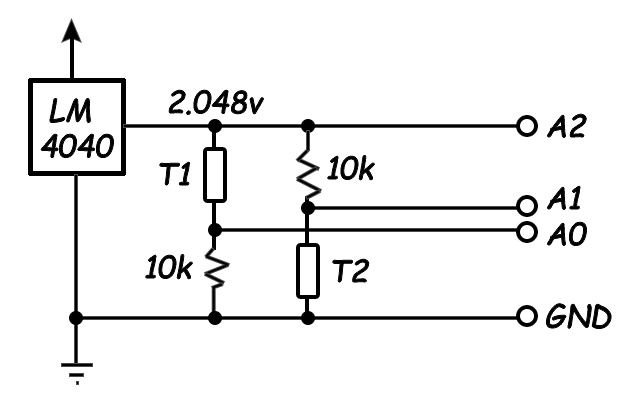
Read the difference between A0 and A1 as a differential input, and read A2 as a single-ended input. That will give you an ‘almost‘ ratio-metric measurement because you record every voltage affecting the output. (although since the supply is not Aref like it would be in a regular ADC – the uncorrelated noise in the LM4040 excitation voltage ‘between’ those two readings will not get corrected) I treat the ref. resistors as ‘perfect’ in my calculations, which forces their tempco errors into the thermistor constants during calibration.

The diodes shunt any voltages that exceed their vF, protecting the ADC from spikes beyond the +/-0.256v range at high gain. AND the leakage that Shottky’s are known for bleeds away residual charge on the piezo, preventing drift from the 1.65v bias point. All the data presented in this post used this circuit. Other diodes, or even garden variety LED’s, could also be used to clip the signal at different voltages. Most have far less leakage than Shottkys, so you might need to add a large value bleed resistor. If you do end up with an offset, an old trick is to run a very aggressive low pass filter on your readings to obtain the offset and then remove it by subtraction.
Piezos can also be read with bridge arrangements if they are physically connected with alternating polarities, but that’s not usually the case for active sensors. I have a new project in the works where the sensor will only generate +/- 5mv, and I’d like to see if capturing signals that small is even possible with the ADS1115. To reveal where the weak points are I’ll test it with a single piezo disk reading at the highest gain and fastest sample rates. At this sensitivity a 5mv swing will only produce ~640 counts. With my signal only covering 2% of the bit range, I’m hoping that the differential readings will compensate (?) for noise on the rails. The data sheet warns about low input impedance (710kΩ) but I don’t think that will affect this test. Another significant limitation of the ADS1115 is that, like the Arduino driving it, no voltages below GND, or above Vcc are allowed on any input. Bridge arrangements automatically bias to the mid-point, so while the tie-in points might go ‘negative’ relative to each other, they are still positive relative to GND on the ADC. For single sensor applications with +/- output, you need to provide that biasing with a couple of resistors.
An often overlooked feature of the ADS is the programmable comparator which can set threshold alarms on the ALRT/RDY output. Most loggers operate with fixed interval sampling, but this makes it difficult to measure things like airborne exposure peaks for chemical vapors; even with short intervals. Sensor-triggered sampling can also save battery power by letting you sleep the CPU – especially when you are monitoring environments that are only ‘active’ during certain seasons, or with rainfall events. The different comparator modes on the ADS1115 also offer some interesting possibilities for system control.
Driving the ADS1115:
This chip’s been around for a long time, so there are several libraries to choose from. And, as usual, many of them don’t support the features that a project building loggers would be most interested in. I suspect this is because wireless coms use such a prodigious amount of power that few in the IOT crowd would bother writing efficient code for chips that already auto-sleep. The Adafruit library even inserts 8ms delay statements – wasting cpu power and throttling the sample rate to 125sps. Rowberg’s I2Cdevlib does a better job with setConversionReadyPinMode() functions. But his code example only polls the I/O status, rather than using the hardware interrupts available on the same pin.
Perhaps the easiest starting point for beginners is the ADS1115 lite library. This is a stripped down version of Adafruit’s lib. but Myers has removed the explicit delays and replaced them with a do-while loop which polls the Operational Status bit to see when the ADC has a new reading in the output registers. This minimalist approach uses only two main functions:
triggerConversion() – Sets config register bits & then writes that register back to the sensor (which automatically starts a single-shot reading) The ADS1115 auto-sleeps after the reading.
getConversion() – A do-while loop forces the CPU to continuously check the Operational Status bit. That bit change breaks the loop, and getConversion then reads the 16-bit output register.
With this single-shot approach, a short for-loop takes burst of readings:
#include <ADS1115_lite.h> // https://github.com/terryjmyers/ADS1115-Lite
#define numberOfSamples 500
int16_t ADS1115raw[numberOfSamples];
setMux(ADS1115_REG_CONFIG_MUX_DIFF_0_1); // uses #define statements
setSampleRate(ADS1115_REG_CONFIG_DR_860SPS); // for the config bitmasks from
setGain(ADS1115_REG_CONFIG_PGA_0_256V); // the original Adafruit library
for (int i = 0; i < numberOfSamples ; i++) { // I usually read 500 samples
triggerConversion(); // during testing, which fills the
ADS1115raw[i] = getConversion(); // the serial plotter window nicely
}
In single shot mode, you have to re-write the configuration register every time you want a reading:

Myers triggerConversion() function sets the config register with a common Bitwise-OR method. I’m going use this as a starting point, tweaking a few things for better readability and including my standard a 16-bit register functions so this page doesn’t scroll on forever.
(also note that in addition to my typos, wordpress inserts a ton of invisible cruft characters that will mess with the IDE – so don’t copy/paste directly from this post…)
uint16_t config = 0; // All bits set to 0
config |= _rate; config |= _gain; config |= _mux; // sets matching bits to 1
bitSet(config, 8); // MODE set to 1 = single-shot & power-down (the default)
bitSet(config, 15); // setting oneshot bit starts a conversion, bit goes low when done
i2c_write16bitRegister(ADS1115address, ADS1115_REG_POINTER_CONFIG, config);
Sensor Triggered Sampling:
Let’s use the comparator to start each burst of readings in response to me tapping the surface of the desk that the piezo sensor is resting on. Although Myers polling method doesn’t use the ADC’s ALERT/RDY output, we are already set up for triggered bursts because all the comparator control bits were zeroed with config = 0 at the start.
COMP_MODE: 0 => Traditional hysteresis mode (On above Hi_thresh, Off below Lo_thresh)
COMP_POL: 0 => ALERT active brings the pin LOW
COMP_LAT: 0 => NON latching
COMP_QUE: 00 => ALERT after one reading above Hi_thresh (01=2reads, 10=4reads)
With this as the starting point all you have to do to initiate comparator threshold alerts is load some non-default trigger values into the Hi_thresh & Lo_thresh registers. Hi_thresh must be greater than Lo_thresh, and you have to use ‘2s complement’ values
// set Lo_threshold register (0x02) to ‘2’s complement’ equivalent of decimal 250:
i2c_write16bitRegister(ADS1115address, 0x02, 0x00FA);
// set Hi_threshold register (0x03) to equivalent of decimal 300:
i2c_write16bitRegister(ADS1115address, 0x03, 0x012C);
Now we need a way to make the processor respond the ADC’s alert. If I wanted to use the same power wasting methods you find in most sensor libraries, I’d connect ALRT/RDY from the ADC to any digital input pin, and poll the pin until it goes low:
void pollAlertReadyPin() { // this code will time out eventually
for (uint32_t i = 0; i<100000; i++) {
if (!digitalRead(AlertReadyPin)) return; }
Serial.println(“Timeout waiting for AlertReadyPin, it’s stuck high!”);
}
This might be OK for an IOT sensor hanging off of a wall-wart. But for logging applications a hardware interrupt based approach lets you save power by sleeping the processor until the trigger event happens:
void INT1pin_triggered() {
INT1_Flag = true;
}
// – – – – – – later on – – – – – – – – in the main loop – – – – – – – – – – –
uint16_t config = 0; // All bits set to 0
config |= ADS1115_REG_CONFIG_MUX_DIFF_0_1 ; // using #defines from Adafruit lib
config |= ADS1115_REG_CONFIG_DR_475SPS ;
config |= ADS1115_REG_CONFIG_PGA_0_256V ;
bitClear(config, 8); // MODE set to zero = continuous sampling – redundant here
i2c_write16bitRegister(ADS1115address, ADS1115_REG_POINTER_CONFIG, config);
i2c_write16bitRegister(ADS1115address, 0x02, 0x00FA); // set Lo_thresh = 250
i2c_write16bitRegister(ADS1115address, 0x03, 0x012C); // set Hi_thresh = 300
// ALRT/RDY output from ADC is connected to the hardware INT1 pin
set_sleep_mode(SLEEP_MODE_PWR_DOWN);
bitSet(EIFR,INTF1); // clear pre-existing system flags on INT1 pin
noInterrupts ();
attachInterrupt(1,INT1pin_triggered,FALLING);
INT1_Flag = false; // reset the flag before the do loop
sleep_enable();
do { // loop keeps the processor asleep until INT1pin_Flag = true
interrupts ();
sleep_cpu ();
noInterrupts ();
} while ( !INT1_Flag );
detachInterrupt(1);
sleep_disable ();
interrupts ();
// after waking, reset the threshold registers to their defaults to disable the ALERTs
i2c_write16bitRegister(ADS1115address,0x02,0x8000);// Lo_thresh default = 8000h
i2c_write16bitRegister(ADS1115address,0x03,0x7FFF);// Hi_thresh default = 7FFFh
// now gather single-shot readings as before
for (int i = 0; i < numberOfSamples ; i++) {
triggerConversion(); // resets the config register to single shot mode every cycle
ADS1115raw[i] = getConversion();
}
With 200 / 300 set as thresholds, tapping the desk beside the piezo produced:
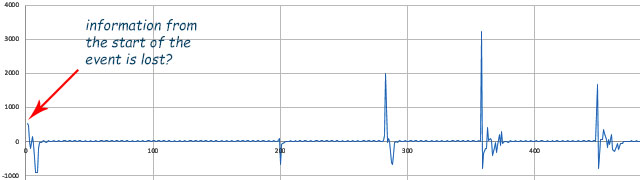
RAW ADC output vs Sample Number: Threshold triggered: A0-A1 differential, 475SPS, 16x PGA,500 samples
With readings above 2000, I was hitting the desk a bit too hard for that 5mv target range. And 475 samples-per-second is not quite fast enough to show piezo sensor behavior. Zooming in also shows that the ADC was aliasing through some background signal:
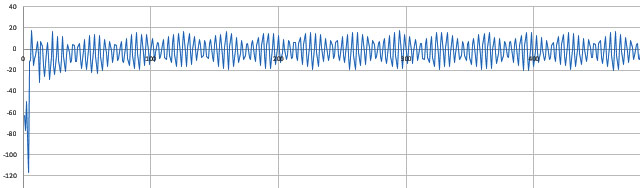
RAW ADC output vs Sample Number: ADS1115 & piezo sensor, A0-A1 differential, 475SPS, 16x PGA, 500 samples
That’s a classic ‘mains hum’ problem. Annoying, but from a research perspective the loss of information from the start of the event was is a more of an issue: What happens if we only get one chance to record our event?
Pretriggered acquisition:
To capture infrequent events, I need to start acquiring data before the reference trigger. And since the waiting period is unknown, those readings need to go into a circular buffer that wraps around and stores each new sample over the oldest one in memory. With this approach the trigger event actually serves to stop the acquisition rather than to start it. And you want to do this gradually, so the samples in the array represent a “slice-in-time” covering the entire event.
The real trick is to sleep the main processor as much as possible during the pre-fetch period. In continuous conversion mode the ADS1115 can alert completion with an 8 msec pulse, but with only one alarm output, the ‘threshold detection’ will have to be done in software:
void INT1pin_triggered() {
INT1_Flag = true;
}
// – – – – – – – – in the main loop – – – – – – – – – – –
uint16_t config = 0; // All bits set to 0
config |= ADS1115_REG_CONFIG_MUX_DIFF_0_1 ; // #defines from Adafruit lib
config |= ADS1115_REG_CONFIG_DR_860SPS ; // the max speed
config |= ADS1115_REG_CONFIG_PGA_0_256V ; // maximum gain
bitClear(config, 8); // MODE set to zero = continuous sampling – redundant
i2c_write16bitRegister(ADS1115address, ADS1115_REG_POINTER_CONFIG, config);
// continuous mode 8ms ‘pulses’ require these specific values in the threshold registers:
i2c_write16bitRegister(ADS1115address, 0x02, 0x0000); //Lo_thresh MS bit must be 0
i2c_write16bitRegister(ADS1115address, 0x03, 0x8000); //Hi_thresh MS bit must be 1
// ALRT/RDY output from ADC is connected to the hardware INT1 pin
// housekeeping variables for sampling loop control:
bool triggerHasHappened = false;
int countdown = numberOfSamples/2; // sets # of samples taken AFTER trigger event
int countup = 0; // If triggered before the array is 1/2 full, countup used to fill remaining
int arrayPointer =0; // tracks where we are in the circular buffer
set_sleep_mode(SLEEP_MODE_PWR_DOWN);
// now loop forever till trigger event starts the countdown
// then collect numberOfSamples/2 more readings
while ( countdown>0 ){
bitSet(EIFR,INTF1); // clear any pre-existing system flags on INT1 pin
noInterrupts ();
attachInterrupt(1,INT1pin_triggered,FALLING);
INT1_Flag = false; // reset the flag before the do loop
sleep_enable();
do // short sleeps while waiting for each ADC reading
{ interrupts (); sleep_cpu (); noInterrupts (); }
while ( !INT1_Flag );
detachInterrupt(1); sleep_disable (); interrupts ();
// load one reading into the ADS1115raw array
ADS1115raw[arrayPointer] =
i2c_read16bitRegister (ADS1115address , ADS1115_REG_POINTER_CONVERT);
// here I’m using 200 as the threshold reading to start the countdown
if (( ADS1115raw [ arrayPointer ] > 200) && ( !triggerHasHappened ) ){
triggerHasHappened = true; //only needs to occur once
if (countup < (numberOfSamples/2)){ // trigger happened b4 array was 1/2 full
countdown=countdown+((numberOfSamples/2)-countup);
// increases countdown by the difference so you always capture numberOfSamples
}
}
if ( triggerHasHappened ){ //then only fill the last half of the array
countdown = countdown-1; // limits the number of new readings
}
// advance arrayPointer with ring-buffer MODULUS formula:
// automatically goes back to zero when the pointer reaches the end of the array
arrayPointer = (arrayPointer + 1) % numberOfSamples;
countup=countup+1;
} // =====end of while ( countdown>0 ) loop======
sleep_disable ();
// reset the registers to startup defaults to stop ADC continuous running
i2c_write16bitRegister(ADS1115address,ADS1115_REG_POINTER_CONFIG,0x8583);
//sets: ±2.048V,128SPS,NoCOMParator,AIN0&AIN1,Trad,NoLAT,NoALERTs,ActiveLOW
i2c_write16bitRegister(ADS1115address,0x02,0x8000); // Lo_thresh default
i2c_write16bitRegister(ADS1115address,0x03,0x7FFF); // Hi_thresh default
//read the ADC output registers to remove any residual ALERT/RDY latches
i2c_read16bitRegister(ADS1115address,ADS1115_REG_POINTER_CONVERT);
Setting countdown = numberOfSamples/2 centers the event in the array. (although 1/3 to 2/3 split might be better?) A tap on the desk with a pencil produced a +/- 5mv swing (~640 raw counts), and my breadboard proto circuit is picking up almost 100 counts of mains hum.
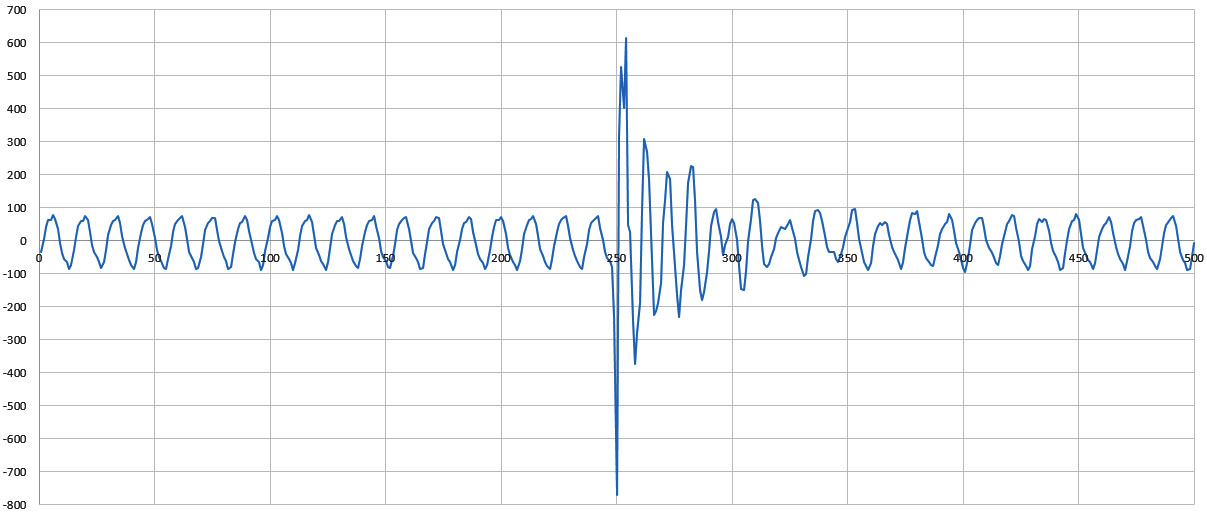
RAW ADC output vs Sample #: 860sps, 16xPGA, diff. A0-A1, USB powered from laptop
Losing 20% of my available signal range to background cruft is a problem. Adding a $10 USB isolator, reduced that by about 1/3. But the 60 Hz signal was still distorting the shape of the waveform significantly or we’d be seeing a smoother damped harmonic..
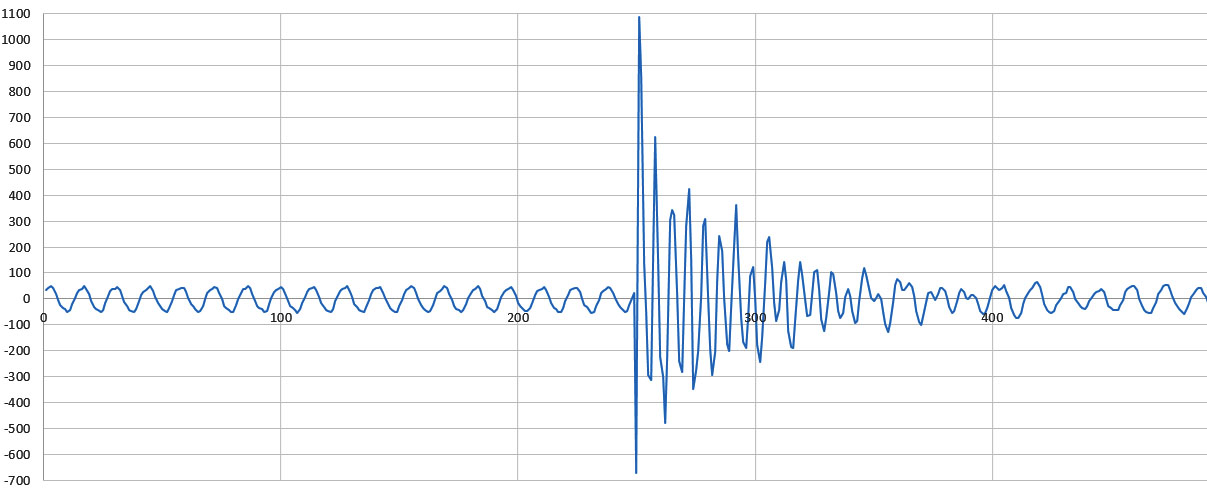
RAW ADC output vs Sample #: 860sps, 16xPGA, diff. A0-A1, with USB isolator. Hit the desk a bit to hard on this one.
My first thought was ‘This is a well behaved, repeating signal – I’ll just subtract it out’. Unfortunately 860 SPS is not a multiple of 60Hz, so simple corrections tend to pass in & out of phase with the hum – eventually making the situation worse. The misalignment means we’d need to do some serious math for the correction at 860SPS, so I’m probably not going to be implementing that filtering on an 8-bit processor. Alternatively I could go back to single shot sampling and use the processors internal timers to only request each new sample at some whole number multiple of the 60 Hz mains cycles, like for example at 600 readings a second. The maximum possible would be 840, and you’d might want to add some jitter to that.
Next I tried a run from batteries only, with the nearby electrical devices all turned off. This reduced the mains hum by ~10x relative to the USB tethered operation:
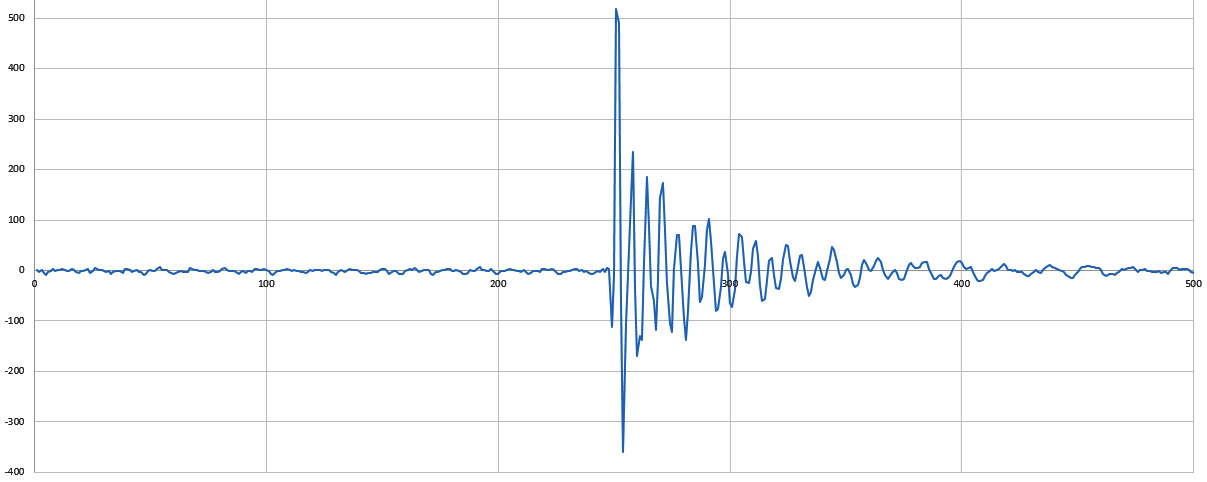
RAW ADC output vs Sample #: 860sps, 16xpga, differential A0-A1, Battery powered logger
A dramatic improvement, with the ‘pre-event’ noise falling below +/- 10 counts. Most of our field deployments are in caves and this ADC looks like it has an acceptable noise floor for work in that kind of isolated environment . But the project also has a teaching component so I’d also like to use this ADC module in classroom settings. Zooming in on that last graphs shows that working with tiny sensor signals will be challenging if we are anywhere inside a building – even if the resting state of the system looks OK:
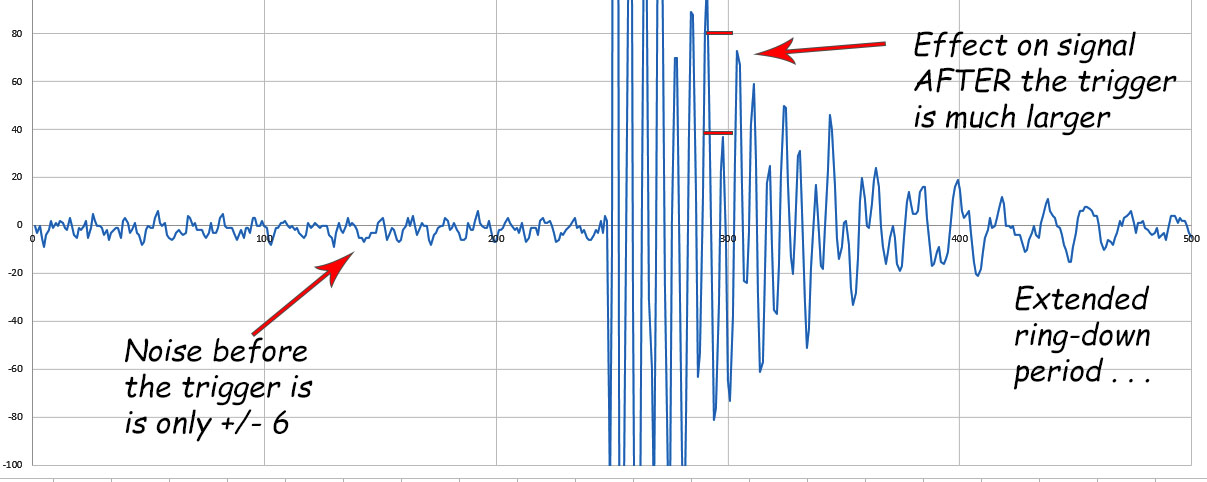
Once the sensor is set in motion, even tiny interferences from the mains will reinforce each other before the system settles again. Even if I use internal timing control to synchronize the readings with a whole number multiple of the mains, it looks like I still won’t be able to use the ‘before’ data to fully correct the ‘after’ effects. This might be specific to way piezo sensor’s resonate, but I’ve got some homework to characterize the effect before we start building a student lab with this module.
Looking in the bright side, even with a power hungry 1284p based logger, the current draw while capturing the pre-event readings averaged less than ~450 μA for the whole system.
The path forward:
The successor to the ADS1115 is the 24-bit ADS1219 which reads up to 1000 SPS (20 Effective Bits, PGA x4). It has integrated input buffers to allow measurement of high impedance inputs & separate inputs for analog vref (true ratiometric!) and digital power/ground. This gives you more options to mitigate power supply noise, which as we’ve seen can be important for small signals. It also offers some built in 50-Hz and 60-Hz rejection, but only at slow sample rates. The ADS1115 is a delta-sigma converter so it continuously samples its inputs (oversampling @250kHz internally) which causes a transfer of charge. From the outside, this appears as a resistance which depends on the sampling rate and depends on the gain of the input stage. Higher gain for more sensitivity yields lower effective input resistance which adds in parallel to the resistance of your sensor circuit. So if you were reading the output of a voltage divider (equivalent) the ADS1115 itself would change the result. So input buffers on the ADS1219 are a welcome addition.
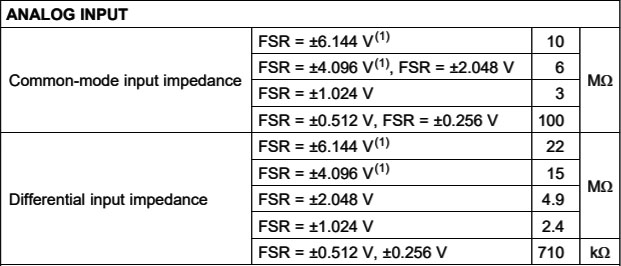
The low input impedance of the ADS1115 can prevent you from using the higher gain settings in differential mode unless you add an opamp/buffer to prevent the ADC from putting to much drain on the sensors output. This is really what separates the ADS from ‘Instrumentation quality ‘ components which generally have much higher input impedances.
There are other 24-bit options in the hobbyist market like the HX711 (24-bit, PGA x32,64,128 – but only x32 on the 2nd channel? ) that is commonly sold with load cells, and I’ve seen it mentioned that the SPI HX711 works with libraries written for the ADS123x series. The ADS1232 (24 bit, fixed x128 gain) might be a easier option for dedicated bridge sensors, and they can be found on eBay for ~$7. One advantage of the ADS123x over the HX711 is that they have a switch that can shut off current to the sensor bridge when the ADC is in Standby or PowerDown mode. Of course then you have the problem that load cells take some time to warm up when power is applied, often taking several minutes to stabilize. You occasionally see seismometer projects using the 32-bit ADS1262, which has a sensitivity >1000x better than the 1115, but with a fairly slow sample rate.
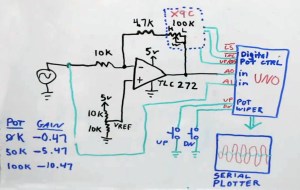
This circuit from Gadget Reboot shows one method of obtaining programmable gain control using an X9C digital potentiometer in the opamp feedback loop. See: Part1 & Part2 The DS3502 gives you an I2C bus version with the same 10k range, though I have no idea what the long term stability of these digital pots is. And 5% tolerance is a bit grim.
But this little experiment has me wondering if for signals in the 1mV range it might be better to spend more effort amplifying rather than moving to higher resolution ADCs. If the real issues are going to be noise and drift, then those might be easier to deal with if the level is boosted first. Microphone preamps can be made from a single 2N3904 transistor and placed in front of a (200x) LM386 modules for less than 50¢ though I suspect there might be lots of distortion. A general purpose (100x) LM358 might do the job on its own, or a (1000x) INA333 or AD623 modules (with the trimpot) which can usually be had for less than $6, as can the AD8221AR. The INA129-HT gets you to 10,000x for ~$9. What I’d really like is an amplifier with the same simplicity of the ADS1115’s PGA. If anyone knows of a cheap I2C/register controlled opamp module in the hobby market price range, I’d love to hear about it.
Addendum 2020-05-24: Interrupt latency with wake from sleep
I just watched an interesting video about the sleeping the ESP32 processors and was quite surprised to find out how long (150 µS) and how variable the hardware interrupt latency is on these expressive processors. This set me down the rabbit hole to find out what the latency is on the AVR processors. On a normally running processor you enter the ISR in 23 clock cycles, which is about 1.5µS @16MHz. However if you loop through POWER_DOWN there are extra things to consider like the fact that disabling the BOD in software (just before sleep) is going to add 60 µS to your wake-up time. You also have an ‘oscillator stabilization period’ of 16k CPU cycles with a standard external oscillator. [see Sect.10.2 of the datasheet] The net result is that the Wake/Start-up time for a 8MHz Arduino is ~1.95ms. AVR’s with 16MHz clocks like the one I used for this test should have a wake-up time of less than 1ms. So I was actually cutting it close to combine full POWER_DOWN sleep & the ADS1115’s highest sampling rate. A 3.3v Pro Mini based build @8MHz would not have kept up unless I used SLEEP_MODE_IDLE to keep the main oscillator running which avoids that long stabilization delay.
Other projects using this ADC:
While I’m giving it a B rating for my current use case, this $1 ADC module is probably one of the best options once your signals get above above 10 mv. The UNO/ADS1115 combo is a ready replacement for benchtop DAQs. Especially since you can add up to four of the modules on the same bus for a multi channel capability. This build of InstESRE’s Pyranometer solders a PDB-C139 directly onto the ADS1115 module, and adds an analog TMP36 for temperature correction.
If you actually want mains signals in your data, then Open energy monitor has a project reading AC with the YHDC SCT-013-000 . Current sensors like that often make readings that are not referenced to ground so you have to use an ADC capable of differential readings. Although this project focuses getting the most out of cheap eBay modules, the ADS1115 repeatedly makes appearances alongside more pricey sensors like this DIY nitrox tester, and this rather impressive Air Quality Index (AQI) monitor from Ryan Kinnett; Those low power modules from Spec-Sensor look very interesting…

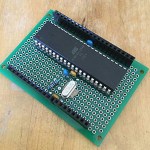

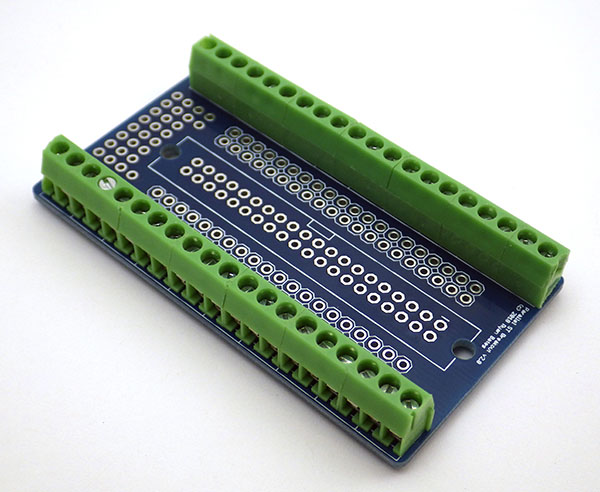
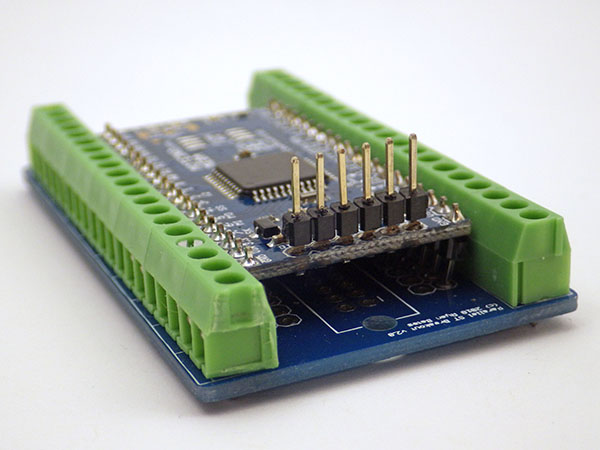






 Underwater Arduino Data Loggers