Monthly Archives: July 2014

Drip Sensor Update: The Gamma Build

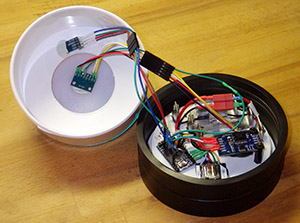
I suggested in the last post that a new build usually comes together on the third iteration, so I though I would post a few photos of the current drip sensor, to show how much they changed in that short series:

Alpha, Beta & Gamma builds

Alpha, Beta & Gamma builds of the Cave Pearl Drip Sensor

That Alpha would only detect drops in the very center of the housing, and often registered double hits because of the splash back from the complex surface topography, which also caused a buildup of water on the surface, further interfering with the signal. So I removed the pressure and temperature sensor wells from the Beta, and used a heat gun to bow the surface and shed water.  I hand sanded the pvc to make the strike surface thinner and more responsive, which increased the “reliable” sweet spot to the diameter of the circle you see on drawn there. This worked well, but as you might imagine removing that hour long fabrication step rose to the top of the priority list (if necessity is the mother of invention, laziness is surely the father…) I also did not want to penetrate the housing for those standoffs if I could avoid it because this device has to maintain integrity with constant water impact at exactly that spot.

JB Plasicweld bonds the accelerometer to the cap

Plastic-weld bonds the sensor, preserving the integrity of the housing

My solution to both problems was to solvent weld a four inch knock out cap to the top of the hard pvc shell.  The green color you see there is ABS to PVC transition cement, that I learned about back at the beginning of the project when I was mangling Leggo bricks for internal scaffolding. The ABS is translucent, so the LED no longer needs a portal of clear epoxy because the light passes right through.  The knockout is thin and stiff, which eliminates all that sanding and improves the response of the accelerometers so much that now the device even responds to loud noises, and almost the entire surface sensitive to the smallest drip.  As a result I now have to tweak the settings to reduce the sensitivity so we don’t get too many false positives.  But on the third build of a new sensor, that’s the kind of problem you want to have.  I though the flat surface might resurrect the water pooling problem we had on the Alpha, but in the end it just ended up being a lesson in how I still miss things that are really darned obvious, because simply setting the drip sensor up with a slight tilt will shed the water without affecting the operation at all.  (I am just glad I realized this before some three year old came along and pointed it out to me…)

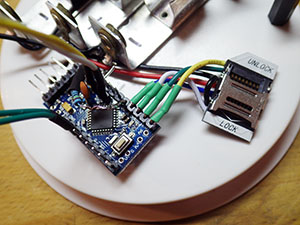
These guys are only $1.5 each, and are much easier to work with than the plastic micro SD adapters

Much easier to solder those jumpers now.

Wirefold

The trickiest part of the build is routing the wires to reduce strain. Thin silicone 26awg wire helps quite a bit there.

There have been a few improvements to the logging platform as well.  I found these really inexpensive  raspberry pi SD card adapters that are mounted on their own pcb, which neatly solves the melting problem that the cheap plastic  adapters give you if you linger too long with your soldering iron.

Drip Sensor Gamma BuildSo this is the new baby, and I am now running burn tests on loggers using a few different clone boards, including a Rocket Scream Mini Ultra, as they have some very interesting power saving features that might significantly increase the operating time, while keeping the overall simplicity of the three component design.  I expect a few more issues will arise in testing, so I will hold off posting the code to Github, till I am sure that they are behaving properly.  I am still a bit stunned that these drip sensors came together so quickly, but perhaps the last six months of work on the flow meters had something to do with that. 🙂

<— Click here to continue reading the story—>  .

Addendum

Adafruit just posted a video from the National Science Foundation showing how water droplets move on various hydrophobic surfaces.  Way cool…

Addendum 2014-12-11:

We deployed our first batch of these drip sensors in August, and when we went back to get them in December, we were delighted to find that the first real world run was a resounding success.

Building your sensors & underwater housings from scratch

I reviewed my build journal recently, and found enough themes in there for another bit of bloggy catharsis.  No one should mistake this as the advice of an expert in anything, as I have a long way to go before I start collecting karma points at the playground. But at least I can claim that these ideas are well tested, because as the saying goes, I never make the same mistake twice – I make it 5 or 6 times… just to be sure.

Prototyping:
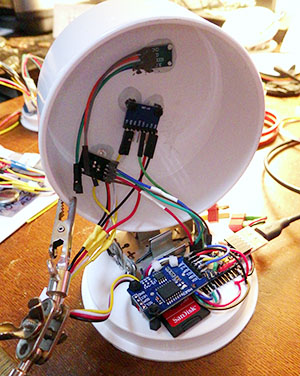
Only RTC & interrupt lines get soldered to the mcu.

Only RTC, SD, & interrupt lines soldered to the mcu.

Join the forums: Everyone says read the datasheets first….well from this beginners perspective that’s B.S.  Even when I started to understand all the terms I was reading, it was still a major leap of understanding to realize what the information in the data sheet implied… (and I still go through it with each new sensor)  If you want to get rolling on something start with the discussion forums, because it’s likely that someone there has already walked down your path, or one very close to it. Thirty minutes Goggling Sparkfun, Stack Exchange, or searching through places like the Arduino Playground, will get you farther than several hours reading the datasheet. Of course you will eventually end up doing that too...just don’t start there.  Often the forums lead you to some well commented GitHub code examples.  It is so much easier to understand the data sheet, when you have a piece of relevant code in front of you at the same time. Datasheets are written solely for corporate electronics engineers, because unless you represent the 10 to 100 thousand unit MOQ,  you simply don’t show up on company radar.

( Sometimes it even seems that a company deliberately tries to hide the functions built into their own ICs from the maker community.  For example: the mysterious Digital Motion Processor (DMP) functions of the invensense 9150. I have yet to find a single example of an Arduino script accessing these features though the 9150 is commonly used in quad copters. I’d have thought that having Euler angle & 9DOF quaternion calculations done for free, would have drawn some serious attention from those those guys.)

You need one completely “trusted” set of kit:  Which you will pay dearly for, but you need it to test out each new component you are thinking of adding to your project. (I still haul out my original Uno for this from time to time, because the darned thing is virtually indestructible…)
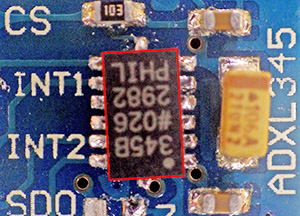
More than a few of the cheap eBay boards are D.O.A.

About 1 in 10 of the cheap eBay boards are D.O.A. This  ADXL345 board had a pretty typical alignment skew: X & Y axes were ok, Z did not read.

Connect new parts one at a time:  Do not add to your grief by connecting two new untested pieces of equipment to each other at the same time. (like, for example, a new FTDI board, and an Arduino clone of off eBay….grrrrr….) I am slowly learning what it is that you are paying for when a given sensor module sells for $20 from a trusted source like Sparkfun and $2 from China.  It’s probably not the components (although I hear there are fake IC’s out there) but something else that’s just as important.  If you watch the Tiny Circuits promo vid, around the 5 minute mark you see a person manually re-positioning the components that the pick and place machine laid down, and then around 7:15 you see someone testing each board before shipping. At this point I have seen enough of the eBay stuff that I am pretty sure that these two steps are never done on the clone boards. So If you go down that route, you are implicitly agreeing to do those jobs yourself (in addition to cleaning off all the excess flux left on the boards…)  This is not a problem when I am just hacking something together, and then testing it on the bench (or in the bathtub…) but not a risk I will take lightly for the fieldwork units.

And while we are on the topic of those cheap modules, they almost always arrive with connections broken out for both SPI and I2C, but you will likely use them as one or the other, meaning that you often need non adjacent pins soldered onto the breakout. I used to fiddle with crappy metal “helping hands” things (now replaced by a far more effective Panavise Jr)  to get those single pins soldered into place, but now I simply use a bread board to hold the pins in the correct locations before soldering:
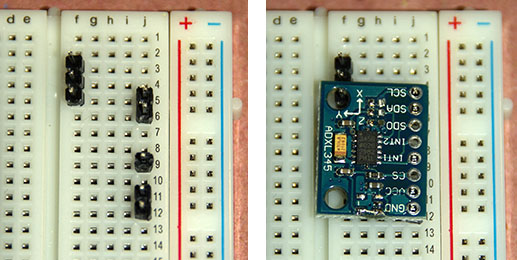
Many thanks to my bother Mike for showing me this soldering technique!

Many thanks to my bother for showing me this soldering technique!

Modularize your designs:   Breadboards were never very practical for me because most of my projects get bashed around, and are supposed to run while the whole thing is in motion. But even after the prototype stage my sensors are not usually soldered directly to the data loggers. Yes, it’s a pain constantly making custom all those custom interconnect cables, especially since I color code everything – I2C bus, interrupt lines, …everything. And once you get an early prototype working, immediately build another one, and do all of your tests, etc., on the second unit, with the first working unit just sitting on the shelf.  Then if something stops working, you can use process of elimination with the known good modules to isolate the cause of the problem quickly. Often this technique helps me identify that the problem is actually in the software, and not with the hardware at all.  But I am still wading my way through the wonderful world of crimp connectors for ones that will prove robust enough for fieldwork. (note: I’ve adopted Deans Micro Plugs for my current builds…)

Coding:

Hit the verify button often, even when you make “simple” changes:  Don’t wait till you have been working for half an hour because humans can only remember 7±3 things (for this human, even less than that…)  You will be backtracking allot and error messages in the AVRc programming environment are usually about as helpful as a baby crying. You know something is wrong, but often you cant figure out what the problem is from the feedback it give you.  Something as simple as: “Hey man,  you left out a semicolon at the end of line 17” can be reported with anything from a one line “Expected X before Y” error to twenty (or more…) lines of cryptic compiler faults. Sometimes Google is your only friend when this happens.

The utility of a piece of code is directly proportional to how dangerous it is to use: For example: Global #define statements are tricky…especially when you are using libraries, because you never know when you have tried to “re-define” something hidden in one of those libraries. Interrupt handling is another example of something tremendously useful, and really easy to screw up when you have more than one sensor generating interrupts in the same piece of code, at the same time.

Software faults almost always show a repeating pattern of behavior: At least that’s been my experience so far. Bad wiring, or some other issue with the physical build, (like a v. regulator thermaling out…) hangs the system in a way that is much more unpredictable.  Of course, finding those patterns is a heck of a lot easier when your project is a data logger in the first place…

Physically putting “stuff” together:

Third time’s a charm:  If your alpha works at all; that’s a great success. The holes will be in the wrong place, you will use too much epoxy, and it will be a clunky octopus of dodgy wiring. But even if it only runs for a single day, it has done the job of showing if the idea will work. (and they make such stylish book-ends…right?) The second build lets you sort out the right physical locations for all the components, and eliminates that hour of laborious hand-sanding that you really did not need to do.  This is also the model that lets you work out most of the software bugs, because it is usually much easier to open & close without breaking fragile jumpers all the time.  But for me at least,  it’s the third build that usually comes together in a way that feels right.

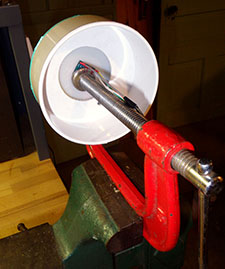
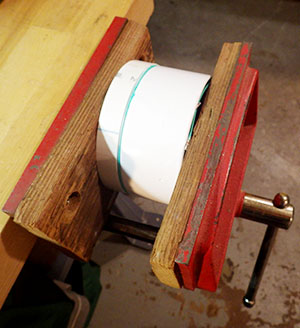
This type of bench vise is worth finding. I picked this used one up for $10, and it has been fantastic for holding parts together while epoxies cure & solvents weld PVC parts.

This type of bench vise is handy. I picked this one up for $10, at a garage sale and it has been fantastic for holding parts together while epoxies cure & solvents weld.

Adhesives & epoxies can be one of the most expensive components in your physical build:  (I wasn’t expecting this one) I go through a fair bit of Loctite E30-CL  (or E00CL for better PVC bonding) for my hull pen-etrations, and I love the fine control of the applicator gun.  But the mixing nozzles alone are more than a buck each, and they are elegantly design to waste a large volume of that precious epoxy with every use, which then solidifies inside the nozzles turning them into expensive single use devices.  That irritated me enough to start experimenting, and it turns out that Goof-off  (mainly xylene, and 2-ethanol) cleans out those applicator nozzles relatively easily. (Acetone would also work) I usually buy my adhesives from Zoro Tools. (note: their product search function is terrible, I use Google Shopping to hunt for stuff on Zoro’s site)  There are plenty of cheap Loctite sellers on eBay, but many are hawking expired lots.  In a pinch, I fall back to good old JB weld, and I use PlasticWeld putty absolutely everywhere because it nicely adheres sensor boards to both PVC & ABS in a way that is strong, but still removable (sort of..) if you have to repair something. Be careful not to bridge contacts with your adhesives on really sensitive sensors.  Most of these epoxies do not conduct electricity, so I use JB weld to shore up weak jumpers on I2C lines all the time. I have had problems with some sensors not working after gluing, probably because the cured epoxy added capacitive effects to the circuits. I have also started experimenting with 3M’s VHB double sided tape (for low surface energy plastic & acrylic substrates) to see if that is easier to work with. (Note: after testing the VHB did not work as well on the pvc as the standard 5lb mounting tape)

(…and if paying an “arm and a leg” for your adhesives wasn’t bad enough, those cheerful, brightly colored labels hide some fairly dire warnings about skin contact literally causing cancer, or vapors so dangerous that use of the product anywhere other than a open field is guaranteed to give you brain damage & significantly harm your … uhhh … “reproductive capacity”. Don’t believe me? Get a 200x microscope and read that fine print for yourself… just make sure you do it some place far away from stoves, heaters, electric motors and all other sources of ignition…like soldering irons 🙂 )

The shop course that you only took in high school to boost your marks will finally start to come in handy:  Turns out that working with PVC is almost the same as working with wood, so I was surprised by how much time I spent scoping woodworking forums while figuring out how to cut weird angles and then re-assemble things.

BigIron

An angle grinder pulls the rust off of old school tools in short order.

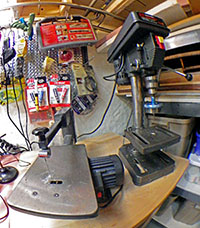
You can build anything with three pieces of  “iron”: A good soldering iron, a drill press, and a 13″ bench top scroll saw (which cuts PVC and trims circuit boards beautifully).  I have not regretted for one second putting down $100 for my little Haiko from Adafruit. (Wish I had bought the thing at the very start of this adventure.) But my other two irons are vintage Sears Craftsman models which cost next to nothing because when I bought them, they looked like flea-market clunkers from the days before plastic was invented. Cleaning them up was worth the effort because they weigh a ton, and are rock solid stable. In fact, these days I actually go out of my way to get old tools for my workshop. So if you see me one morning, at yet another garage sale, don’t be surprised if my hands are full of weird drill bits,  strange clamps, and other rusty lumps of metal that are even older than I am.

And last but not least:

I know everyone has their own taste, but I find that Pandora’s “Chillout” channel (in the Dance/Electronic genre section) just has a really good vibe for working on the bench. Spacey electronica wallpaper-music smoothly delivers the hyper focus I need to sustain a long soldering session, especially when the clock ticks on into the wee hours… .

Addendum 2014-07-29 

I have another one to add to this list but it stands outside of any category because it seems to apply equally. I call it the ‘Principal of Equivalent Annoyance’, and it’s just the observation that the dumb little things on a project take up at least as much time as the big important things. For example: when you connect allot of parts together, the physical behavior of your wires matters more than you’d expect because the difference between good insulation and stiff hard plastic puts quite a bit of pressure on the wires when you fit everything into the housing. Once and a while I am left with some excess lead wire from a sensor and when I open up the left over multicore cable I sometimes find a meter or so of the perfect wire.  Soft silicone insulation, 12 or more strands, no tinning… the stuff is fantastic to work with and is so flexible that it doesn’t stress the connections. Of course it never has any identification marks on it that might lead me to the source.  So I am slowly working my way through every brand of hook-up wire on the market, searching for this holy grail, and wasting more time on it than I even want to think about.  I suspect this is kind of thing happens on every project.

Addendum 2014-09-13

There are a few contenders so far in my ongoing search for “the perfect wire”: 

Adafruit sells 26AWG in multiple colors. This is my current favorite wire because they sell it in easy to handle packages (~0.95/2m) and they have the only grey & orange colored stuff I have found so far. It probably sounds silly to mention the packaging, but from other vendors like Hobby king, or eBay, you can expect to spend at least an hour untangling the spaghetti when your wire arrives. Their 30AWG is 0.70/2m, and is very handy for running jumpers across the surface of a breakout board.

Sparkfun sells their red & black silicone hook up wire at a good price, I just wish they had more colors.

Cal Test Electronics CT2956 Test Lead Wire:  (24awg $9 for 10 m, green, white) It is soft multi-strand bare copper and there is some variability in the stiffness as they seem to use different stranding depending on the color you order, but all of it is much more flexible than pvc insulated wire.  The insulation is nice and thin, so it crimps well into the standard 0.1″ connectors, and it is a bit stiffer than the Turnigy, so it will hold a bend you put in the wire.

Turnigy Soft Silicone Wire: (24awg $.60-$1 per meter, red, black, yellow blue) which is popular in the RC plane/Quadcoper crowd. Multi-strand “tinned” copper, with lots of colors. The very soft insulation is about twice the thickness of the Cal Test, but it still crimps nicely. (note: Hobby King does not let you mix warehouses on orders…)

There are two drawbacks to to using really soft silicone wire: You can not push the female crimp connector ends into the housings as you normally would with jumper wire. You have to dig in and pull the connector through the enclosure with tweezers.  The other issue is that because the silicone conducts heat so much faster than pvc, you will burn your fingers more often while soldering if you are not careful. In return,  you can stuff as much spaghetti as you want into a very tight housing without putting pressure your the solder joints in the process.  The wire stripper from Pololu, works well on both types of wire.

Addendum 2016-03-11

More eBay vendors for silicone jacket wire are appearing over time, and they are a great place to find a wider selection of colors like brown, purple, & pink. With module & jumper builds like mine, you need as many different colors as you can get your hands on. 

Addendum 2015-01-09 

I received a 10″ craftsman 21400 band saw for Christmas this year. And just like the night & day transition that occurred when I went from a crummy soldering iron to the lovely Hakko, my cuts have now become more accurate and virtually effortless.  No more risking my fingers trying to cut pipe on the table saw! And free-handing with a band saw accomplishes 90% of what I could do with the the jig saw as well.  If you can only afford to own one cutting machine, then I am now convinced it should be a bench-top band saw. Wish I had it from the beginning…

Addendum 2015-01-16

Looks like I am not the only one who is irritated by the waste generated by the Loctite 50ml nozzles. The folks over at RCuniverse confirm that acetone makes a good solvent for cleaning out the mixing tubes, and that its easier to do if you remove the white plastic mixing baffles first. They also mention that putting the nozzles in bags in the freezer will prevent the epoxy from setting, so I might try this trick to see if I can get the tubes to “self clean” by gravity. Looks like All-Spec is the cheapest source for the nozzles, but I keep finding “generic” mixing nozzles on eBay that claim they work with both 3M and Loctite adhesives. Haven’t tried them yet though.

Addendum 2015-02-02

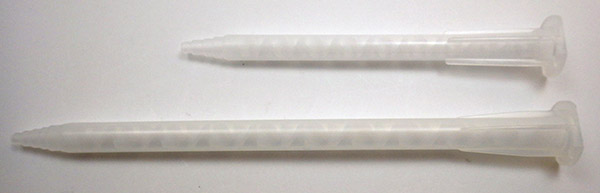
I bought some of the cheep MA5.4-17S 17 element mixing nozzles, and although the fit perfectly onto the 50ml dispenser, they were much shorter than the 15cm, 20 element, Loctite 98623 nozzles I usually use:

TopCheap_BottomLoctite

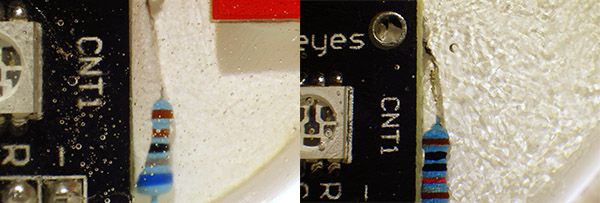
I thought this was a good thing, as I hate wasting all the epoxy that is left in the dispenser after every use and these smaller ones only retained 1.68ml in the barrel. I did some test pours under nearly identical conditions, and the smaller nozzles left a significant “swirly” pattern when the cured epoxy was examined close up a few days later:

Left side: Loctite Nozzle Right Side: Short Generic Nozzle

Left side: Loctite Nozzle                                                   Right Side: Short MA5.4-17s nozzle

I am interpreting this as a density gradient formed by inadequate mixing in the shorter nozzles. The epoxy has still set hard as a rock so I am not sure if this compromises the integrity too much. There are also listings for MA6.3-20S and MA6.3-21S nozzles, and I will try some of those next time.

(Note: the MA6.3’s worked great, as did the $10 applicator guns on eBay)

A New Drip Sensor for Cave Research

 … we interrupt this hydro-metric-flow-thingy blog to bring you an important announcement …

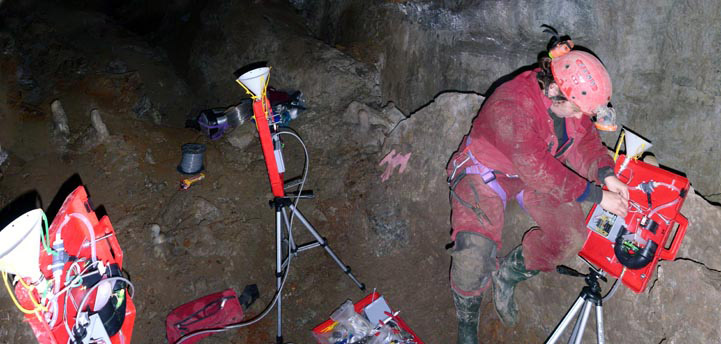
Trish wiring up our home made drip sensors in 2004

Trish installing her drip sensors in a B.C. cave

Back in 2004, my wife did a post-doc at McMaster university with Dr. Derek Ford & Dr. Henry Schwartz, that focused on drip hydrology in caves.   She set up a monitoring network of sensors to determine drip rates & water chemistry and we were very fortunate at that time to have the help of Kenrick Chin, who built custom data loggers for the project. While I was not capable of addressing the electronics back then, I did manage to create some DIY tipping-bucket sensors, which Trish combined with thermistors & conductivity sensors into a portable assembly. The resulting contraptions yielded an impressive data set, but we had minor problems with moisture/corrosion, and major problems with cave critters who absolutely love chewing on plastic cable insulation.

So with that as back story, I am very pleased to introduce a working beta of the new model “D” line of Cave Pearls, for research in “dry” cave environments.  This unit is a drip sensor, prototyped with the ProMini based data logging platform discussed in my previous post, bringing the total parts cost in around $25 (+ 4 hours building time):

.
The unit sleeps until the vibration of a drip impact triggers a hardware interrupt that wakes the Arduino, which then updates a counter variable, pips the LED, and goes right back to sleep.  When the RTC interrupt fires (which is adjustable) the counter data then gets written to the EEprom or SD card.  I actually had multiple sensors on the Alpha unit (temp, pressure, etc) but the back-splash from the protruding sensor wells on top caused spurious drip count readings. So, like the under-water models, the dry cave sensors will have different builds to record the various aspects of the cave environment.

DripSensorBetaWhile re-examination of the 2004 cave sensors has been on the back burner for a while, this drip counter was a direct result of my search for better tilt sensors for the flow meters.  Those investigations lead me to several projects building DIY seismometers, and it occurred to me that if accelerometers were that sensitive, it might be possible to detect drips falling onto the housings.  In the course of evaluating the ADXL345 (and rejecting it from the flow sensors due to relatively low bit depth at 2g) the well commented code posted by wyojustin & Kevin Stevenard introduced me to tap sensing registers.  The “Eureka” moment that followed spurred on a week of furious prototyping, and this new drip counter is the result.  I still have a bit of refining to do as I optimize timing & sensitivity settings, but as you can see from the video, the basic idea works down to around 10 cm fall distance. If I set the sensitivity high enough to catch drips closer than that the acclerometers internal noise starts to generate false positives.

While not directly related to the flow meters, I have a feeling that this kind of positive feedback/serendipity is going to happen with increasing frequency from here on, so I would like to officially retract my statements in the last post, where I implied that the Pro Mini based data loggers were not going to affect the project that much.  A week of soldering later, and I can say with confidence that having a $10 datalogger to prototype with is a huge step forward, even if the specific build never goes into the field.

 … we now return to the regularly scheduled  pend-aqueous-hydropod programming …

<— Click here to continue the story—>

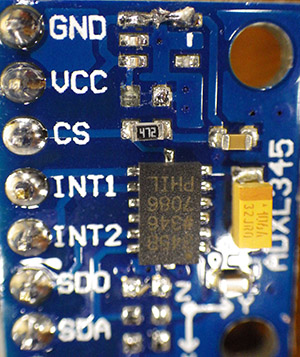
Mods to the ADXL345 on a regulated bus.

Mods to use an ADXL345 on a 3.3volt bus. On newer builds I now only use boards that already have a 3.3v input (Geetech, CJMCU-105, etc.)

Addendum 2014-07-15  

I almost forgot… for those of you wanting to build one of these drip sensors, the ADXL345 was one of the cheep boards from eBay . When all you want is tap sensing, things that the clone boards are notorious for like offsets, drift, etc. don’t matter that much.  Most of these breakouts come with a voltage regulator already installed, but since I was driving the I2C lines from the pro mini, which already has a 3.3v regulator, I had to de-solder the vReg (& its isolation cap.) from the breakout board and then bridge the vcc line straight across. (see top)  And since I2C lines are running through the RTC breakout , they already have 4.7kΩ pullups on them, so I also had to lift the little smd resistors from the accelerometer breakout board. You can see the empty solder pads, just below the chip in the photo.

Addendum 2015-01-10

Just stumbled across someone trying to use capacitance and IR to detect drips without interacting with the drip itself. I think the capacitance idea has legs, but I would worry about all the condensation you get on objects in a cave giving you grief with IR approaches.


A DIY Arduino data logger for $10 from 3 components (2014)

Addendum 2019-01-15:

I posted the $10 DIY Arduino data logger in July 2014, and there have been many updates to the way I assemble the basic three component logger since the early version described in 2014. In 2019 we updated the design to reduce the total build time to about 1 hour: https://thecavepearlproject.org/2019/02/21/easy-1-hour-pro-mini-classroom-datalogger-build-update-feb-2019/   We’ve also added support to the code for using the indicator LED as a light sensor, so you can start monitoring the environment right away :

In 2018 we published in Sensors: Cave Pearl Data Logger: A Flexible Arduino-Based Logging Platform for Long-Term Monitoring in Harsh Environments This paper describes how to optimize these loggers for long-term deployment and the PDF is free to download.


 Original Post from 2014-07-01:

To celebrate Arduino day this year, Sparkfun put their 3.3v Pro Minis on sale for $3. Well, how could I resist that?  I put in my order and, in due time, the little red boxes arrived with the morning mail. I was in the midst of assembling a small army of TinyDuino based logging platforms, so the Pro Minis just sat on the shelf for a while, as hacked into the tiny light sensor boards to drive my 3v sensors.  But then, a couple of weeks ago, I stumbled across a project where someone had soldered a micro SD card adapter directly to the pins of a Pro Mini…What? I had at least half a dozen of those things lying around! Within minutes I was in the basement, waiting for the soldering iron to heat up and realizing that an onboard regulator meant that the RTC could also be connected directly to the board.  Using 90° header pins to provide solder points at the base of the board (keeping the vertical pins free for sensors) I had the thing roughly connected   in less than 30 minutes.  A little scramble to re-jumper an old serial adapter I had in the drawer to run 3 volts (…because I forgot to order the 3v FTDI you need to use the Pro Minis), and the new unit worked like a charm right from the start.  I had cobbled together a working data logger from only three components. I did a little cost estimation:

 ProMiniDatalogger6 3.3v Pro Mini
Ds3232 RTC w At24c32 
256mb Sandisk micro SD (with adapter)
Wires, solder, ties, etc
Deans style connectors
indicator LED, Resistors etc
3v lithium Coin cell
$3.00
$2.00
$2.40
.
$1.00
$0.50
$1.00
$0.53
Total: $10.43
2x 10K ohm taps the vraw pin.

I used two 10Ks to divide the battery voltage in half & put it on A0.  But you could use up to 2 x 10MΩ and bring leakage down to 0.3 µA with a small cap to stabilize the reading.

The Grove hub adds another $3, but it’s not really needed unless you are doing sensor swaps like I am. Otherwise the I2C sensors can just be soldered directly on to the other end of that RTC module.  But I was still missing one piece of the puzzle:  How do I track the battery voltage when I can’t use the internal 1.1v reference trick like I did with the TinyDuino?  I googgled and found an excellent JeeLabs post about how to use a voltage divider to read supply voltages above Vcc on an analog pin. A little tweak to add the analog read to the Vcc read function in the codebase, and I had the cheapest “fully functional” data logger I have ever seen… sitting right in front of me.

It didn’t take long for that moment of “Wait…did that just happen?” to have my brain hoping around like a bullfrog on a hotplate.  You see, while this project originated with the challenge of determining water flow in cave systems, I hoped that there was at least the potential to do more than just keep my favorite hydro-geologist happy.  Over the years we have worked with so many great people at various NGO’s, Eco-Centers, etc. plugging away with boundless spirit & enthusiasm, but hobbled by shoestring budgets.  For these guys, something as expensive as a Hydrolab is just never going to be part of the game.  But if you combine something as cheap as this Pro Mini based logger platform,  with the super simple rubber bottom housings I came up with back in 2013:

IMGP0029this unit survived ~ 4 months
@ 5m depth, 50% salt water.
Fernco Qwik Cap
Nibco 3” pvc endcap
2x 3” knockout cap
4 x 2” 8-32 riser bolts
2x 3AA battery holders
3in of 3” dia pvc pipe
& ¾” pipe for sensor well
& pvc adhesive, etc.,
$3.50
$3.50
$0.60
$1.00
$1.00
.
.
$1.35
Total: $10.95

…then you have some real world environmental monitoring capability for about twenty five bucks.  If you use this with I2C, or one wire sensors, you can sidestep the Arduino’s limited 10bit ADC, and get better data, with more frequent sampling than most, if not all , of the other low priced loggers on the market. (you could also use the ADS1015 12bit OpAmp/ADC combo board…) And because you have the ability to edit the code yourself, it is easy to track the rate of change and increase the sampling frequency during  “events” of interest.  Features like that don’t usually appear in commercial data-loggers until you start spending some serious money.

The only unknown at this point is how long this thing will run on a fresh set of batteries. On the bench this Pro Mini logger (with three sensors & 2x 10k voltage divider attached) draws about 1.8 mA while sleeping.* I figure ~2mA is going to chew through a standard alkaline battery (~2000mAh) in about a month, so a build with 6x AAs should be good for at least 3-4 months depending on the sample frequency.  Most people are not working 30 minutes into a cave & 10 m under water, so that kind of retrieval schedule might be all right.  Or one can make the pvc pipe a bit longer on that housing and have room for another battery pack, which should easily get you past 6 months.  If you really want to splash out you could also go to lithium AA’s which provide an additional 1000 mAh per cell, and probably taking this thing up to a year on 9 cells…

As you might imagine, I have a couple of these loggers running on the bookshelf already, and I will post the burn test results here as soon as I have them. For now, I will simply post the wiring diagram, so anyone who wants to can build one.  Just don’t take too long soldering the contacts on the micro SD card adapter, as you can melt through the plastic around them very quickly.  I also suggest you test each stage of the wiring as you go along, before you finally attach everything to the platform…

Print

Note: that several sources recommend pullups on CS, MOSI, MISO and SCK, though I have been running my loggers without them, but I have found that some SD cards take a very long time to go to sleep unless CS, MOSI & MISO are pulled up.

Read the Addendums below!: The Rocket Scream Mini Ultra is the lowest current board I have found so far & good SD cards are crucial to the success of your data logger. My latest builds based on this design usually get down to ~0.35 mA while sleeping. Recent field tests have shown that 3 good quality AA batteries will power a logger that draws 0.33mA for 9 months.

You can download my latest code to drive these loggers from the Cave Pearl Project GitHub.  Just make sure you set the initial configuration defines properly before you compile (ie: uncomment ‘#define vRegulatedMCU 1’,  and comment out ‘#define unregulatedMCU’ if you use a resistor divider to read Vbat…which you really have to do if you want the unit to gracefully power down when the batteries expire) Also note that depending on which sensor you connect, other changes to the code will be necessary to co-ordinate buffering, and formatting the data that gets written to the SD card.

So how does this affect the project?

Power tests in progress

Pro Mini power tests are now under way….( Update: read the Addendums -> Sparkfun Pro Mini’s gave me a host of problems with the SD card communications, while many cheap clone boards worked fine? )

The currently deployed Pearls are set to be retrieved in about a month, and if they deliver the same (> 1 year) power performance that the Betas did, I suspect I will be staying with the TinyDuinos for a while, at least for long term in-cave deployments.  Just getting out to a remote cave site is often the most expensive part of field work, so if another fifty bucks worth of components means that I can safely wait a month or two (or six…) to find a flight deal, then I will ante up.  But we already have people interested in using the Pearls for monitoring flows at springs and other open water locations.  Most of them are on site, and they can service batteries by simply swimming out into the bay.  So I think I will get those folks rolling with Pro Mini based loggers right from the start.  It makes the build cheap enough that if some of these more exposed units “walk away on their own”, we wont be loosing our shirts. And it sends a tenner over to Sparkfun, without doubt one of the coolest nerd companies out there.  As the Pro Minis are licensed boards, Sparkfun also passes on a bit of each sale to Mr. Banzi et. al., and that’s pretty good too.

<— Click here to continue reading—>

Addendum 2014-07-02

I have discovered that it is possible to run the Pro Mini’s without the on-board voltage regulators…in fact, so many people have been manually cutting the trace to the voltage regulator to get low power operation out of the ProMinis, that Sparkfun has now put a power isolation jumper right into the design.  So if you get sensors that already have voltage regulators (as many IMUs do), or you use sensors that can handle large voltage swings (like the DS18B20)  you could turn this pro mini based logger into something like the unregulated TinyDuinos that will operate for a very long time on couple of AA’s. You would still need to regulate & level shift the SD card lines for data logger operation so another alternative is to bypass the on-board regulators by simply connecting an alternate supply directly to Vcc.  This is how the FTDI serial board powers your Arduino while you have it connected to the usb cable!  

fatlib16 posted a picture (near the bottom of the thread) of his ProMini powered by an MCP1700 :  you can bypass the on-board regulators by simply connecting the battery supply directly to Vcc  -> this is how the FTDI serial board powers your Arduino while you have it connected to the usb cable!

These guys are only $1.5 each, and are much easier to work with than the plastic micro SD adapters

I just discovered I should not be leaving those unused pins floating like I have in this photo – they should have pull-up resistors.

Addendum 2014-08-07

 There are some very inexpensive Raspberry pi micro SD card adapters on the market now that are much easier to work with than the thin plastic SD card adapters I used on the first build. I suspect that the spring connectors are more physically robust as well. Of course you could try Adafruit’s adapter for $2.50, and if you had money to burn, you could go to the Sparkfun SD board.

Addendum 2014-08-11

 Well serves me right for counting my chickens…After doing many different run tests on six different drip loggers built to this basic design I have some good news, and some bad news. The good news is that the cheap pro mini clone boards run well, logging data till they bring the power supply voltage low, at which point the voltage regulators go into a cycling reset loop, which so far has not hurt the data files on the SD cards. The bad news is that the units that have given me the most problems are…the ones that use the “real” Sparkfun Pro Mini. I still have not figured out why, but they have had no end of SD card problems.  I don’t think its because too much current being drawn, as they are only 128mb cards, and the units seem to be able to write SD data when they connected to the 3.3v FTDI board, which can only deliver about 50mA in total.  I will post an update when I get a handle on this problem…. (Note: later trials worked OK with other ProMini boards…these were just a bad batch. )

Addendum 2014-08-17

 I have about a weeks worth of burn test data in hand from six different loggers built with this basic design.  As I expected, the pro mini clone boards draw down a 3xAA power supply at almost the same rate no matter what the sample frequency is set to, indicating that the sleep current on the MC5205 voltage regulator they all use might the biggest load* on the system. (*This is an error – I found out later that the SD cards I was using were the real energy vampires. See below  From these rough tests it looks like I should get at least 3-4 months of operation out of them (on regular alkalines – 1/3 more with lithium) before the power supply gets down to the 3.35v minimum needed by the regulator. The best results so far have been from loggers built with the Rocket Scream Mini Ultra:

As I want to see how gracefully these voltage regulated systems behave when the batteries croak, I started the ultra based unit on a 3.4 volt power supply which already had a dead cell in it just to bring the voltage into the range of the voltage regulators minimum. More than 40000 SD card records later and the voltage is now at 3.3volts.  I did nothing special to the board myself, just loaded the same code running on the clone board tests above, which makes liberal use of generic sleep code (ie: not using Rocket screams special libraries!) This thing is performing like one of my unregulated tiny-duino based systems. I will leave this unit running until the voltage divider reading vRaw gets to 2800 mv,  (this might be a destructive test as this is way below the MCP1700T regulators minimum rating) because I still want to see how gracefully it handles a full brown out.   

Addendum 2014-09-23

Just a quick update on the three component loggers. At this point I have put together about 20 of them with many different boards and they all seem to work OK (including the Sparkfun ProMini’s – Although they still give me more grief initializing the SD than the clones, even with the pin13 led removed. I just don’t know if their regulator is up to the task?). However I have found that the sleeping SD cards themselves are by far the most important part of the system, and that most builds come close to 0.3mA sleep current if you have REAL Sandisk memory cards….  However if you get burned with counterfeit cards your sleep currents can go above 5mA!  Assuming your sensors don’t draw too much, with a 0.3 mA sleep current, a single AA battery could power one of these unit for a couple of months, and 3 AA’s should get you close to nine months. The big quid pro quo here is that nothing is protecting your SD card if you suffer a power failure. I’m working on that now. Making smaller individual data files is probably the first step.

Addendum 2014-09-27

 After more testing of the many 64, 128 & 256 mb cards I bought from eBay, and I have found that if you have the “good” Sandisk cards, the whole logger should gravitate towards about 0.33 mA,  even if you leave connections 8 & 9 unconnected as I did in my earlier builds. (& I have an ADXL345 on my drip counter test system so about 40 µA of that current is being drawn by the sensor) However lots of my microSD cards seem to need pullups (OR pulldown) resistors on the two card connections that are not used to keep them from floating, or the sleep currents will be much higher. In the forums (and in the datasheets) people seems to be recommending 50-100K pullups, and I have done a few experiments which I will write up as a longer post later.

But the general result is: If this logger system+Sd card sleeps around 0.3mA with the pins floating, you already have a good card, pullups won’t change much, and about 1/2 the time it actually increases sleep current if you use a pull down resistor, possibly as high as 0.9 mA (the other half of the time the pulldown does not increase the sleep current). If your system draws between 0.5 mA to 2mA with the card sleeping…”generally” I find a pull down resistor on 8 &9  (I used 20k ohm)  works better than a pullup, and should bring the whole system down to a stable 0.33 mA sleeping current.  This is very strange because no where in the data sheets does it specify to use a pulldown. I probably need to do more testing here so I put a pullup on the illustration above just to be safe.

If you don’t get to near 0.33 mA with either a pullup or a pulldown, then you have a bad microSD card, and you should go find another one. If your “sleeping system” current for this logger design is above 2 mA, then you have a REALLY bad counterfeit microSD card, and you should just throw it in the rubbish bin. And the worst cards of all bounce down to a reasonably low sleep current initially, and then slowly “creep” upwards over the course of 2-10 of minutes, as you are watching the meter.  Those cards often seem to be bad, whether you put a pullup, or a pulldown, on the unused lines so the card controller is probably NFG.

Generally, if you have a good card, it goes into sleep state almost instantly as soon as the MCU sleeps, and you can see that on the current meter because the numbers are completely stable at the lower reading right away. The crummy cards seem to wander around for a while, like they have to think about whether they actually want to go to sleep or not.

Addendum 2014-09-27

I have posted an updated version of this logger design. The new version adds a Pololu latching power switch, which allows the Arduino to cut its own power when the batteries fall low, protecting the data on the SD card. This is a real trade off because the switch itself draws as much current as the whole logger when sleeping, so you would have to go to six batteries to see 6-9 months of operation for that build. I have also provided links to sources of components have been using for my builds.

Addendum 2016-01-25

Reliable sources recommend pullups on the SPI lines, though I have been running my loggers for a long time without them.  I have noticed that some SD cards take a really long time to go to sleep unless CS, MOSI & MISO are pulled up, and some just refuse to sleep at all without the pullups. These weak pullup resistors are not described in this tutorial. If you already have loggers built without them, there is a workaround using the 328’s internal pull-up resistors that I current have in testing.  Despite the fact that only CS requires it, I found that all three lines had to be pulled up before misbehaving cards went to sleep properly. So add these lines to the beginning of your setup before you run sd.begin

// pulling up the SPI lines
pinMode(chipSelect, OUTPUT); digitalWrite(chipSelect, HIGH); //pullup the CS pin
pinMode(MOSIpin, OUTPUT); digitalWrite(MOSIpin, HIGH);//pullup the MOSI pin
pinMode(MISOpin, INPUT); digitalWrite(MISOpin, HIGH); //pullup the MISO pin
delay(1);

  It’s worth noting that there is some debate about the utility of this approach. Because SPI is a complex protocol, adding internal or external pullups could actually prevent you from being able to use other SPI sensors with your data logger. That is one reason why I tend to stick to I2C & analog sensors on my builds, so the SPI lines are dedicated to the SD card only.